
The Address Book page lets you save, search, manage, and reuse shipping addresses in your ShipTime account.
Use the numbered sections in the screenshot below to learn what each option does.
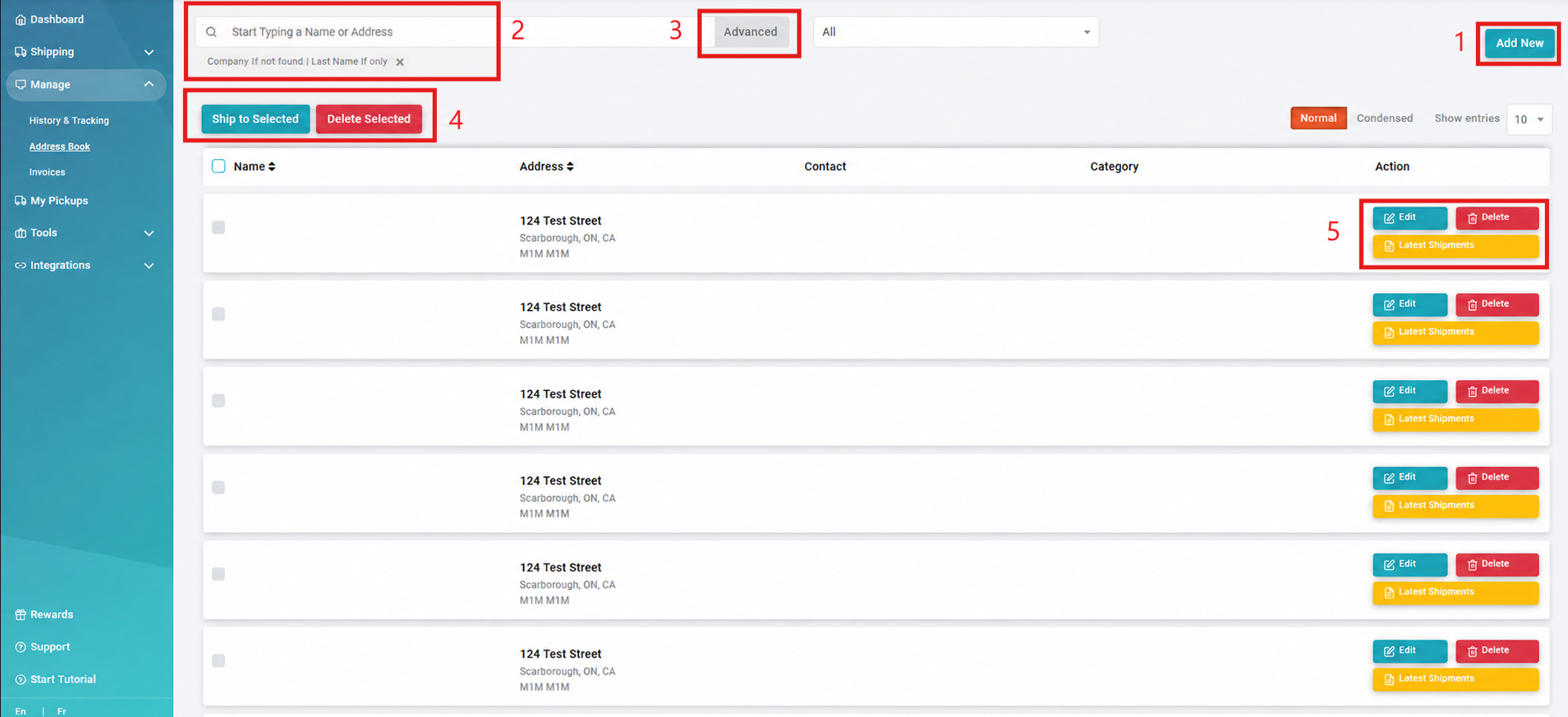
- Add New
Add a new contact or shipping address to your Address Book. - Search Bar
Search for an address using the contact name or address information. - Advanced Search
Use additional search options to narrow the results and locate a specific saved address. - Selected Address Options
When one or more addresses are selected, available actions may include:- Ship to Selected: Starts a Quote & Ship using the selected address. If multiple addresses are selected, ShipTime starts a Batch Shipment.
- Delete Selected: Removes the selected address or addresses from your Address Book.
- Address Action Buttons
Use the available actions for an individual saved address:- Edit: Update the saved address information.
- Delete: Remove the address from your Address Book.
- Latest Shipments: View recent shipments sent to that address.
Need Help?
If you have questions about adding, finding, or managing saved addresses, contact our Heroic Support™ team.