
You can connect your Magento store to ShipTime using the ShipTime connector for Magento 2.
This setup requires access to your Magento hosting server, including SSH or Terminal access.
Start the integration in ShipTime
- Log in to your ShipTime account.
- Go to Integrations > New Integration.
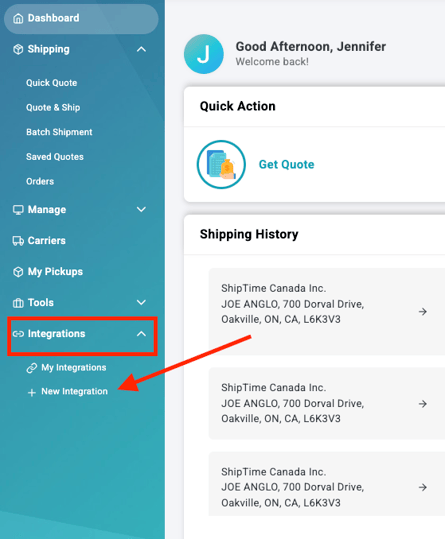
- Find Magento and select the + icon.

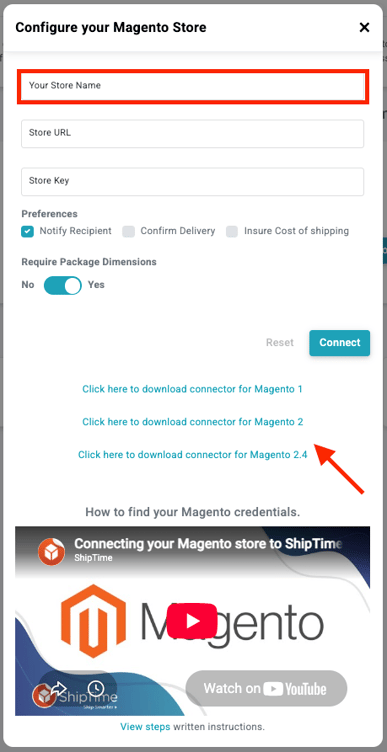
- Enter a Store Name.
- Download the ShipTime bridge connector plugin for Magento 2.4
Install the connector on your Magento server
The following steps must be completed on the server hosting your Magento store.
- Extract the ShipTime connector into your Magento store’s root directory.
- Use SSH or Terminal to access the server where Magento is hosted.
- Navigate to the Magento root directory.
- Navigate to the
/bindirectory:
cd bin
- Run:
./magento module:enable --all --clear-static-content
- Then run:
./magento setup:upgrade
These steps require server-level access and should be completed by someone familiar with Magento administration and command-line tools.
Get your Store Key from Magento
- Log in to your Magento admin area.
- Select Integration Bridge.
- Select Install Connector.
- Copy the Store Key.
Complete the connection in ShipTime
- Return to your ShipTime browser tab.
- Paste the Store Key into the appropriate field.
- Return to Magento and copy your store’s base URL from the browser address bar.
Use the portion of the URL before /admin.
- Return to ShipTime and paste the URL into the Store URL field.
- Select Connect.
- Select Start Sync.
Your Magento store should then begin syncing with ShipTime.
Need help?
If you have trouble installing the Magento connector or completing the integration, contact our Technical Support team at techsupport@shiptime.com.
Not using ShipTime yet? Create your free ShipTime account to access discounted rates from leading couriers, all in one platform.