
When your Shopify store is connected to ShipTime and Real-Time Rates are enabled, you can choose which ShipTime carrier services are displayed to customers at checkout.
This lets you control the shipping options available in Shopify while continuing to use ShipTime for rate calculations.
Before you begin
Make sure:
- Your Shopify store is connected to ShipTime
- Real-Time Rates are enabled
- Your Shopify plan supports third-party carrier-calculated shipping
- Product weights are entered in Shopify
- Product dimensions are entered in ShipTime
Enable Real-Time Rates in ShipTime
- In ShipTime, go to Integrations > New Integration.
- Connect your Shopify store.
- Enable Real-Time Rates.
- Under Shipping Quote Based On, select Individual Items.
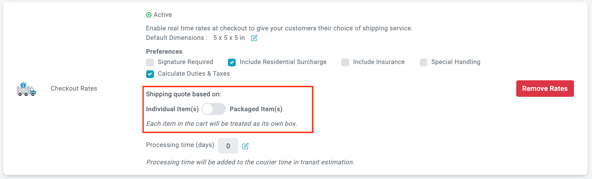
You can change the integration to Packaged Items later after the Shopify carrier preferences have been configured.
Choose carrier services in Shopify
- Log in to your Shopify Admin.
- Go to Settings
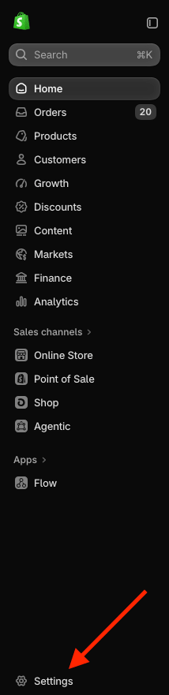
- Select Shipping and delivery.
- Under your Shipping profiles select the profile you wish to update
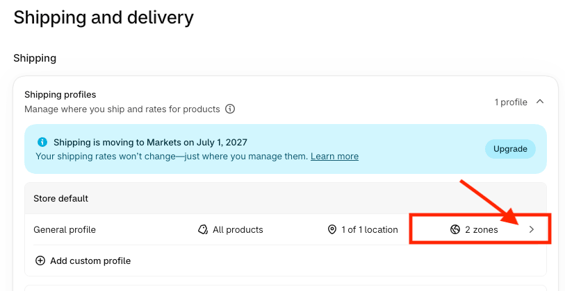
- Find the applicable shipping zone and select Add shipping option if needed
- Under the rate type, select Carrier or app calculated.
- Choose ShipTime Rate Provider.
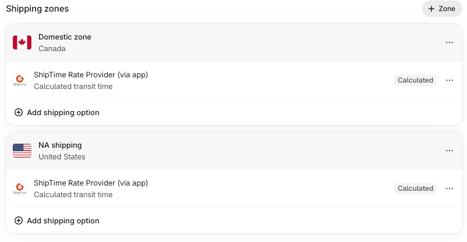
- Select ShipTime Rate Provider (via app)
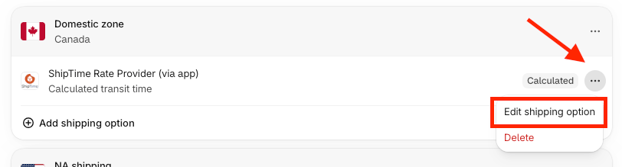
- Select Add Services.
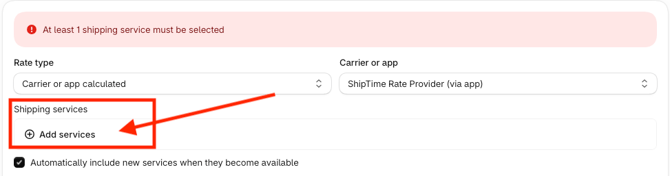
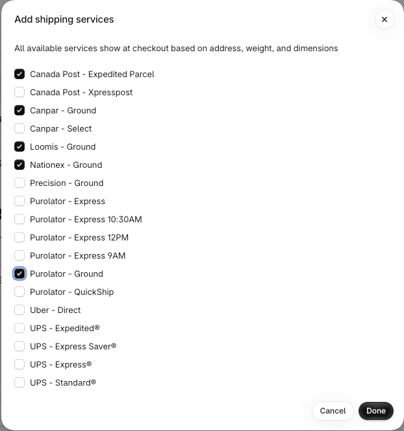
- Choose the ShipTime services you want customers to see at checkout and click Done.
Once saved, Shopify will display only the selected ShipTime services when Real-Time Rates are available at checkout.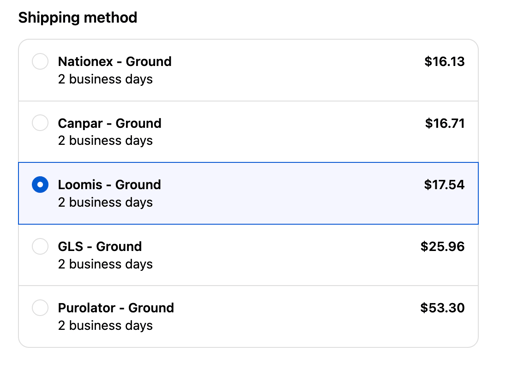
Switch to Packaged Items if needed
After your Shopify carrier preferences have been configured, you can return to ShipTime and change how rates are calculated.
Go to Integrations > My Integrations, select Manage Store for your Shopify integration, and change the setting from Individual Items to Packaged Items if that better matches your shipping setup.
Make sure product information is complete
Carrier preferences in Shopify will only work when ShipTime can return a shipping rate.
For accurate Real-Time Rates:
- Add product weights in Shopify
- Add product length, width, and height in ShipTime
Missing or inaccurate product information can prevent rates from displaying correctly.
Need help?
If you have trouble configuring Shopify carrier preferences or displaying Real-Time Rates, contact our Technical Support team at techsupport@shiptime.com.
Not using ShipTime yet? Create your free ShipTime account to access discounted rates from leading couriers, all in one platform.