
Paperless commercial invoicing allows eligible international shipment documents to be transmitted electronically to the courier instead of requiring printed copies to be attached to the package.
ShipTime supports electronic commercial invoice submission with select couriers, including UPS, FedEx, and DHL, where available.
Availability can vary by courier, service, origin, destination, and customs requirements.
Which couriers support paperless commercial invoices?
ShipTime currently supports paperless or electronic customs-document submission with:
- UPS through UPS Paperless® Invoice
- FedEx through FedEx Electronic Trade Documents (ETD)
- DHL through DHL Paperless Trade
Each courier uses its own system, but the purpose is similar: eligible customs documents are transmitted electronically instead of relying only on printed documents attached to the shipment. UPS confirms that eligible account holders can transmit commercial invoices digitally, while FedEx ETD allows customs documents to be submitted electronically.
How do I know if my commercial invoice was submitted electronically?
When paperless commercial invoicing is available for your shipment, ShipTime will indicate that the commercial invoice was submitted electronically after you complete the shipment.
In these cases, the commercial invoice may no longer appear as a document that needs to be printed after Finalize & Pay.
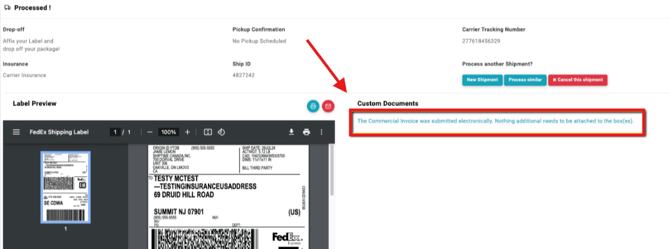
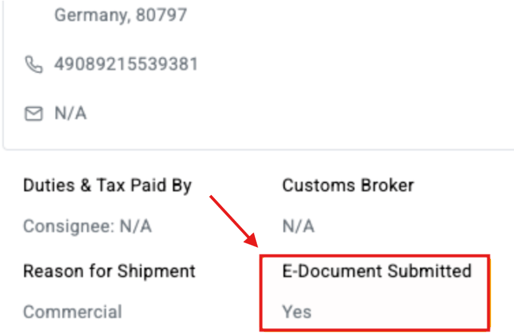
You can also review this information in History & Tracking under the Commercial Invoice section.
Do I still need to print a commercial invoice?
Not always.
If the shipment qualifies for paperless commercial invoicing, the applicable commercial invoice can be transmitted electronically.
However, some destinations, shipment types, or customs requirements may still require printed or original documentation. FedEx, for example, notes that some destinations may still require original paperwork even when electronic trade documents are used.
Always follow the instructions displayed in ShipTime when creating the shipment.
What happens if paperless invoicing is not available?
If electronic submission is not available for the shipment, print the required commercial invoice and attach the appropriate number of copies securely to the outside of the package in a document pouch.
Any other required customs documents should also be included as instructed.
What are the benefits of paperless commercial invoicing?
When available, electronic document submission can help:
- reduce the amount of paperwork that needs to be printed and attached
- reduce the risk of paperwork becoming separated from the shipment
- provide customs information electronically to the courier
- simplify preparation of eligible international shipments
Is paperless invoicing available for every international shipment?
No.
Eligibility depends on factors such as:
- courier
- service
- origin and destination
- shipment contents
- customs and regulatory requirements
If ShipTime indicates that documents must be printed, follow those instructions even if the courier generally supports paperless invoicing.
If you have questions about the documentation required for an international shipment, contact our Heroic Support™ team.