
ShipTime’s Address Book lets you save frequently used shipping addresses so you do not have to enter the same contact information each time you create a shipment.
You can save an address either while creating a shipment or directly from your Address Book.
How do I save an address while creating a shipment?
When entering the recipient information for a shipment:
- Enter the recipient’s address and contact details.
- Select Save to Address Book.
- Continue creating the shipment as usual.
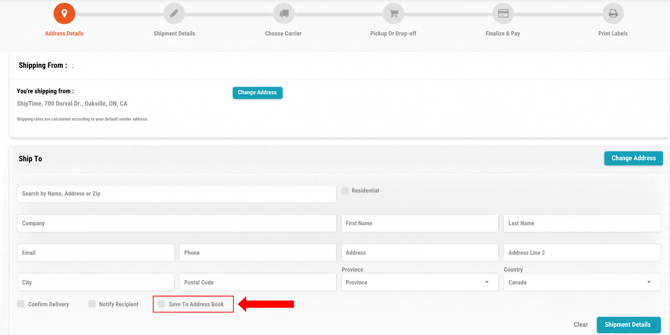
The contact will be saved to your Address Book for future shipments.
How do I add a contact directly to my Address Book?
You can also create a contact before starting a shipment.
- Sign in to your ShipTime account.
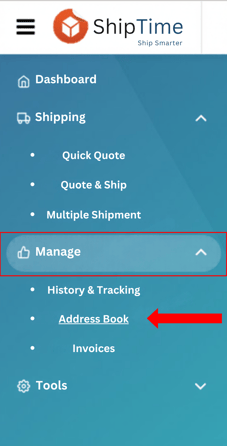
- From the left-hand menu, go to Manage > Address Book.
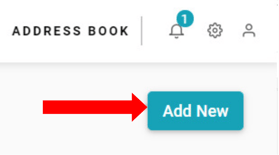
- Select Add New.
- Enter the contact information, including the applicable:
- name
- company name
- street address
- city
- province/state
- postal/ZIP code
- country
- phone number
- email address
- Review the information for accuracy.
- Select Save.
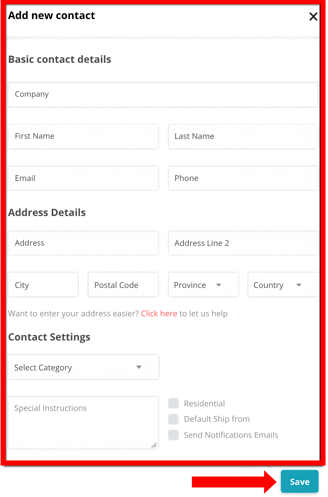
The contact will now be available from your Address Book when creating future shipments.
Why use the Address Book?
Saving frequently used addresses can help you:
- reduce repetitive data entry
- create repeat shipments more quickly
- reduce address-entry errors
- keep frequently used shipping contacts organized in one place
Can I use a saved contact when creating a shipment?
Yes. Once an address has been saved, you can select it from your Address Book instead of entering the information manually.
For more information, see How Do I Ship to a Contact in My Address Book?
Can I set a saved address as my default Ship-From address?
Yes. Any eligible address saved in your Address Book can be selected as your default Ship-From address.
For instructions, see How to Set a Default Ship-From Address in ShipTime.
Need help with your Address Book?
If you need help adding or managing contacts in ShipTime, contact our Heroic Support™ team.
Not using ShipTime yet? Create your free ShipTime account to access discounted rates from leading couriers, all in one platform.