
ShipTime supports Full Truckload (FTL) shipping for freight that requires the dedicated use of an entire truck.
FTL can be a good option for larger freight shipments, multiple pallets, oversized items, or shipments that benefit from dedicated truck capacity and fewer handling points.
What is Full Truckload shipping?
With Full Truckload (FTL) shipping, your freight uses the truck’s available capacity rather than sharing trailer space with other shipments, as it would with Less Than Truckload (LTL) service.
FTL may be suitable when:
- you are shipping a larger volume of freight
- your shipment requires dedicated truck space
- multiple pallets or large equipment need to move together
- fewer handling points are preferred
- the freight is oversized, fragile, or high value
- transit requirements make a dedicated truck more appropriate
How do I book an FTL shipment?
Step 1: Select Full Truckload
Start a new shipment in ShipTime and select Full Truckload (FTL) as the shipment type.
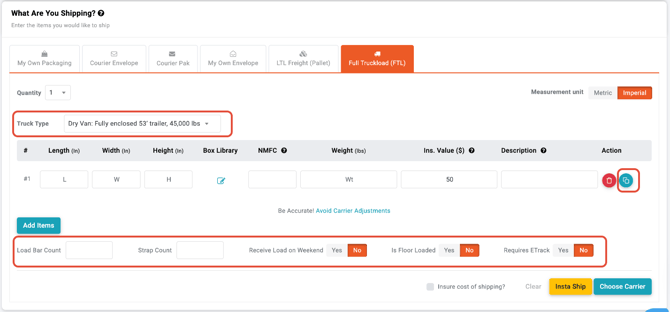
Step 2: Choose the truck type
Select the truck type that best fits your shipment.
Enter the applicable shipment information, including:
- dimensions
- weight
- Declared Value
- freight description
- any required accessorial services
Once the shipment details are complete, select Choose Carrier.
Step 3: Compare available options
Review the available carrier or service options based on your shipment details and requested pickup date.
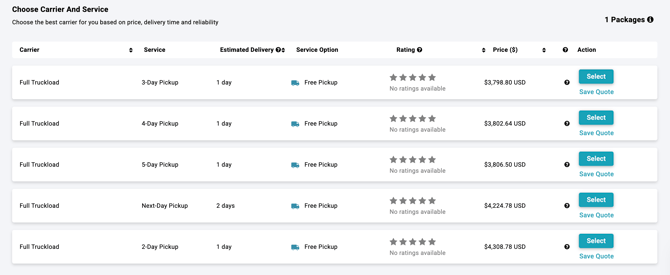
Select the option that best fits your shipment requirements.
Step 4: Enter pickup and delivery details
Complete the applicable pickup and delivery information and select any additional services required for the shipment.
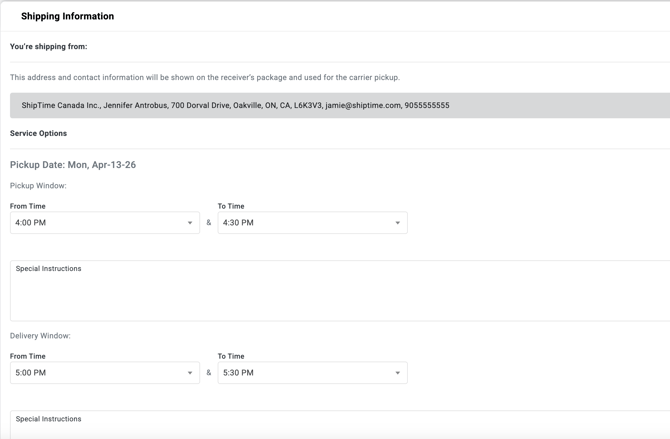
Make sure all location and access requirements are entered accurately so the appropriate equipment and service can be arranged.
Step 5: Review and finalize
Review the shipment information carefully before completing the booking.
Confirm:
- pickup and delivery addresses
- truck type
- freight dimensions and weight
- shipment description
- accessorial services
- Declared Value
- selected service
Complete checkout to finalize the FTL shipment.
What size shipment can I send by FTL?
FTL capacity depends on the truck type selected.
When creating your shipment, review the available equipment specifications carefully. Requirements can vary based on:
- maximum weight
- interior length
- interior width
- interior height
- total freight volume
Your freight must fit within the capacity of the selected equipment.
What if I only need to ship a few pallets?
If your freight does not require an entire truck, Less Than Truckload (LTL) may be a better option.
LTL allows freight from multiple customers to share trailer space and can be more suitable for smaller palletized shipments.
For more information, see LTL Shipping with ShipTime.
Need help choosing between FTL and LTL?
If you are unsure which freight option is appropriate for your shipment, contact our Heroic Support™ team.
Not using ShipTime yet? Create your free ShipTime account to access discounted rates from leading couriers, all in one platform.