
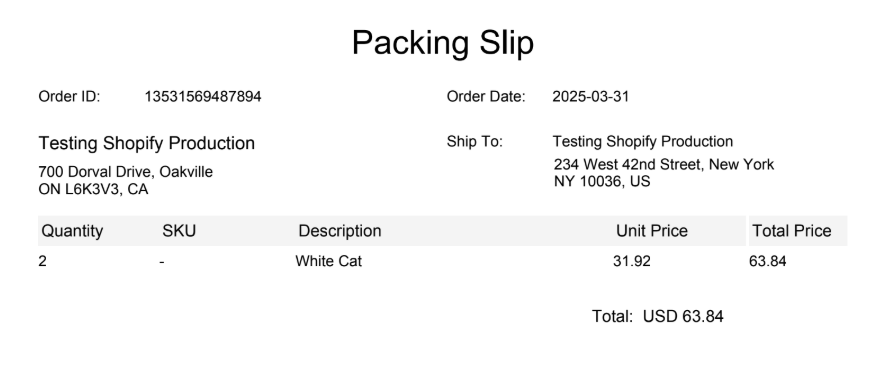
ShipTime allows you to generate packing slips when processing eligible eCommerce orders.
When this option is enabled for your connected store, ShipTime can generate a packing slip along with the shipping label when the order is processed.
How do I enable packing slips?
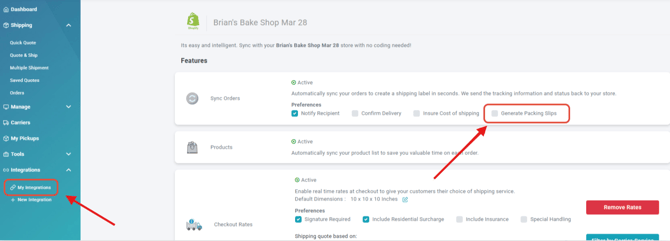
To enable packing slips for a connected eCommerce store:
- Sign in to your ShipTime account.
- Go to your connected eCommerce integrations.
- Open Manage Store for the applicable integration.
- Find the Generate Packing Slips option.
- Enable the option and save your changes.
When is the packing slip generated?
Once Generate Packing Slips is enabled, the packing slip will be available when you process and ship eligible orders from that connected eCommerce store.
This allows you to print the packing slip along with the shipping label as part of your order-fulfillment process.
Why don’t I see a packing slip?
If a packing slip is not being generated, confirm that:
- the order came from a connected eCommerce store
- Generate Packing Slips is enabled under Manage Store
- the integration settings were saved successfully
If the option is enabled and packing slips are still not being generated, contact our Heroic Support™ team and we can help review your integration settings.