
ShipTime gives you several ways to create a shipment, depending on what you need to do. Sign in to your account and select the appropriate option under Shipping.
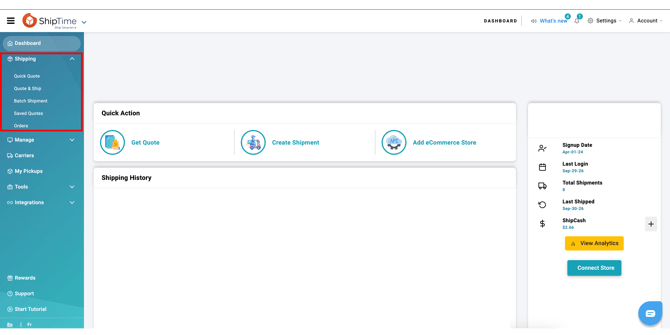
Quick Quote
Use Quick Quote when you want to compare available shipping rates without entering all of the recipient's address details.
Enter the required shipment information, such as the destination postal code, package weight, and dimensions, to view available rates.
If you find an option you want to use, select the rate to continue to Quote & Ship. The shipment information you've already entered will carry over so you can complete the remaining details.
Quote & Ship
Use Quote & Ship when you're ready to create a shipment.
You'll be asked to enter the required information, including:
- Sender and recipient addresses
- Package weight and dimensions
- Shipment and package details
Once you've entered the required information, ShipTime will display the available courier services and rates for your shipment.
Select the service that works for you and follow the prompts to complete your shipment. Depending on the service selected, you may also be able to choose between available pickup and drop-off options.
After the shipment is processed, your shipping label will be generated. Print the label and securely attach it to your package before handing the shipment over to the courier.
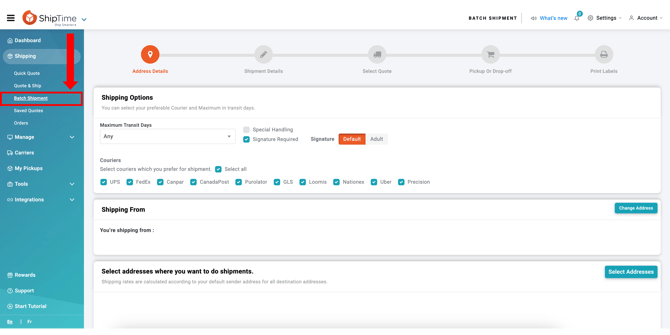
Batch Shipment
Use Batch Shipment when you need to send packages to multiple destinations.
Enter the destinations and package information to view the available shipping options and costs. Once the batch is processed, ShipTime will generate the applicable shipping labels for your packages.
Need help creating a shipment?
Our Heroic Support™ team is here for you. Contact us by phone, live chat, or email for the answers you need to keep Shipping Smarter with confidence.
Not using ShipTime yet? Create your free ShipTime account to access discounted rates from leading couriers, all in one platform.