
You can set an address from your ShipTime address book as your default Ship-From address. Once set, ShipTime will automatically populate that address when you create a new shipment, helping save time and keep your shipping information consistent.
Before you begin
The address you want to use must already be saved in your ShipTime Address Book.
If you need to add or update an address first, go to Manage > Address Book.
How do I set a default Ship-From address?
- Sign in to your ShipTime account.
- Select Settings in the top-right corner.
- Select Preferences and Defaults.
- In the Shipment section, select Change Default Address.
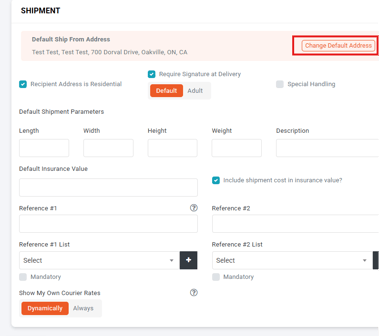
- Search for and select the address you want to use from your address book.
- Select Set Addresses.
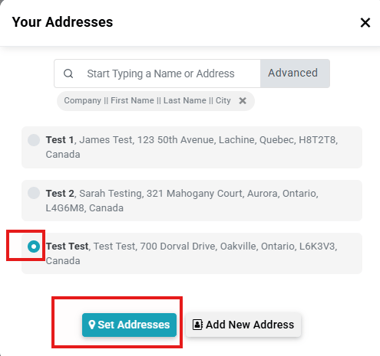
The selected address will now be used as the default Ship-From address when you create new shipments.
Can I change my default address later?
Yes. Return to Settings > Preferences and Defaults and select Change Default Address again.
Choose another saved address and select Set Addresses to update your default.
What if the address I want is not listed?
The default address must already exist in your ShipTime address book.
To add a new one:
- Go to Manage > Address Book.
- Add and save the address.
- Return to Settings > Preferences and Defaults.
- Select Change Default Address and choose the newly saved address.
Why set a default Ship-From address?
A default address can help:
- reduce repetitive data entry
- keep the same origin address populated for recurring shipments
- reduce the chance of selecting the wrong Ship-From location
- speed up shipment creation
You can still change the Ship-From address for an individual shipment when needed.
Need help managing your shipping addresses?
If you need help with your address book or default shipment settings, contact our Heroic Support™ team.
Not using ShipTime yet? Create your free ShipTime account to access discounted rates from leading couriers, all in one platform.