
The Manifest page lets you review and create manifests for eligible Bring Your Own Rates (BYOR) shipments.
A manifest groups applicable shipments together for a specific carrier, making it easier to review the shipments included before they are provided to the carrier.
Use the numbered sections in the screenshot below to learn what each option does.
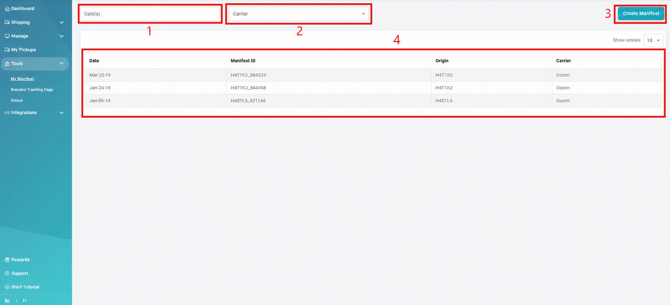
- Date Search
Use the date field to search for manifests created within a specific date or date range. - Carrier Search
Select a carrier to narrow the results and display manifests associated with that carrier. - Create Manifest
Select Create Manifest to generate a new manifest for eligible BYOR shipments.Follow the available prompts to select the applicable carrier and shipments. - Manifest List
Review previously created manifests.The list displays information such as:- manifest date
- Manifest ID
- shipment origin
- carrier
Important
Manifests are available for Bring Your Own Rates (BYOR) shipments only.
Shipments created using ShipTime’s discounted carrier accounts are not included in the Manifest page.
If you use your own connected carrier account through BYOR, the manifest options available may depend on the carrier and the eligible shipments associated with that account.
Need Help?
If you have questions about creating a manifest or managing BYOR shipments, contact our Heroic Support™ team.
For technical issues related to a connected BYOR carrier account, you can also contact techsupport@shiptime.com.