
The Bulk Edit feature on the Orders page allows you to update multiple selected orders at once. This can help speed up order processing when several shipments share the same information.
Use Bulk Edit
- Go to the Orders page in ShipTime.
- Select the orders you want to update using the checkboxes beside each order.
- Select Bulk Edit.
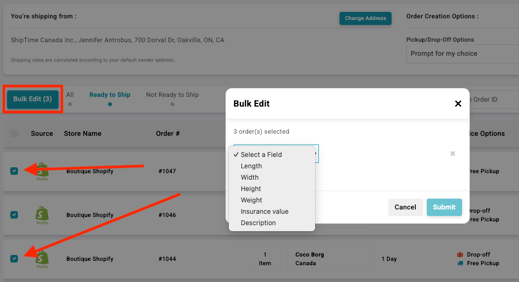
- From the Select a Field dropdown, choose the field you want to update.
Available fields may include:
Length
Width
Height
Weight
Insurance value
Description - Enter the required value for the selected field.
- Add additional fields as needed.
- Select Submit to apply the changes.
All selected orders will be updated with the new information.
Depending on the fields you change, ShipTime may recalculate the shipment and display updated pricing or carrier options.
Important
Review the selected orders before submitting your changes to make sure the same information should be applied to each shipment.
Changes to package dimensions, weight, insurance value, or other shipment details may affect the rates and services available for those orders.
Need help?
If you have trouble using Bulk Edit or updating your eCommerce orders, contact our Technical Support team at techsupport@shiptime.com.
Not using ShipTime yet? Create your free ShipTime account to access discounted rates from leading couriers, all in one platform.