
ShipTime includes reporting and tracking tools that can help you review your shipping activity, monitor costs, and find past shipments.
View shipping insights from the dashboard
The ShipTime dashboard provides an overview of your shipping activity.
Depending on the information available in your account, you may be able to review metrics such as:
- Total shipments
- Shipping costs
- Delivery activity and trends
Review shipment history and tracking
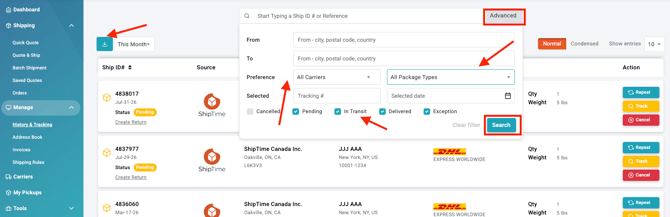
Go to History & Tracking to review past shipments.
You can sort, filter, and search your shipment history using details such as:
- Date
- Tracking number
- Ship ID
- Recipient name
Shipment records can also include details such as shipping cost, delivery status, and courier information.
The download button allows you to export the shipment list to a CSV on your desktop.
Why use ShipTime’s reporting tools?
ShipTime’s reporting and history features can help you:
- Find shipments quickly: Search and filter past shipments using key shipment details.
- Review shipping costs: Look back at shipment costs and activity over time.
- Monitor shipping activity: Use your dashboard and shipment history to better understand your shipping volume and activity.
Need help?
If you need help finding shipment information or using the reporting features in your account, contact our Heroic Support™ team.
Not using ShipTime yet? Create your free ShipTime account to access discounted rates from leading couriers, all in one platform.