
ShipTime’s Branded Tracking feature lets you customize the tracking experience your customers see after a shipment is created.
You can add your branding, business contact information, social media links, and a custom message to make the tracking page feel more connected to your company.
Use the options below to customize your Branded Tracking page.
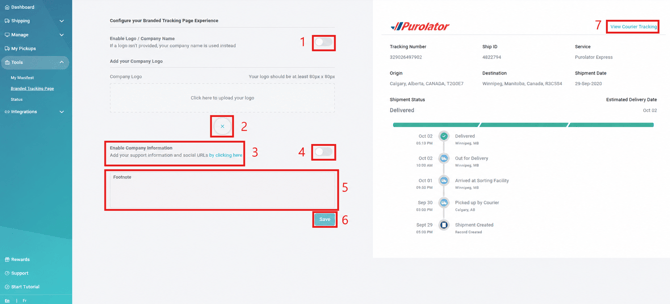
- Logo and Company Name
Use the available toggle to show or hide your company logo and business name on the tracking page. - Remove Uploaded Logo
Remove the current logo if you need to replace it with an updated version. - Business Support Information and Social Media Links
Add your business contact information, such as:- support email
- phone number
- website
- Show or Hide Support Information and Social Links
Use the available toggle to control whether your support information and social media links appear on the tracking page. - Footnote
Add a custom message at the bottom of the tracking page.This can be used for:- support information
- company updates
- promotional messaging
- other customer-facing information
- Save
Select Save after making changes to apply the updates to your Branded Tracking page. - View Courier Tracking Page
Open the carrier’s direct tracking page when you need to review the tracking information provided by the courier.
Why Customize Branded Tracking?
Customizing your tracking page can help you:
- keep your company branding visible throughout the delivery experience
- provide customers with easy access to your support information
- direct customers to your website or social media channels
- share helpful company updates or messages
Need Help?
If you have questions about setting up or updating your Branded Tracking page, contact our Heroic Support™ team.