
Effective July 8, 2026, importers of most consumer products that require certification by the U.S. Consumer Product Safety Commission (CPSC) must electronically file certificate information as part of the U.S. customs entry process.
If you ship regulated consumer products to the United States, understanding these requirements can help reduce customs delays and additional documentation requests.
ShipTime also allows supporting customs and compliance documents to be attached electronically to eligible international shipments.
Does Every Product Require CPSC Certification?Important: ShipTime cannot determine whether your product is regulated by the CPSC, identify which certification is required, issue compliance certificates, or complete CPSC eFiling on your behalf. The responsible manufacturer, importer, and customs filer remain responsible for meeting all applicable CPSC requirements.
No.
CPSC certification requirements apply only to products that are subject to applicable consumer product safety rules, bans, standards, or regulations.
For example:
- Certain children's products require a Children's Product Certificate (CPC) supported by testing from a CPSC-accepted third-party laboratory.
- Certain regulated general-use products require a General Certificate of Conformity (GCC).
Before shipping, determine which requirements apply to each product.
Useful CPSC resources include:
- CPSC eFiling
- The CPSC Regulations, Mandatory Standards and Bans database
- The CPSC Regulatory Robot
- The CPSC eFiling Document Library
If you're unsure about your product's regulatory requirements, CPSC recommends reviewing its guidance or contacting its Small Business Ombudsman.
What Changed on July 8, 2026?Beginning July 8, 2026, importers of most regulated consumer products that require a CPSC certificate must electronically submit the required certificate information to CBP through a Partner Government Agency (PGA) Message Set.
Products imported into a U.S. Foreign Trade Zone and later entered for consumption or warehousing have a later applicability date of January 8, 2027.
How Is CPSC Certificate Information Filed?There are two official eFiling methods.
Option 1: Full PGA Message Set
With this method, the importer provides the required certificate information to its customs filer or broker for submission with the customs entry.
The certificate information can include data such as:
- Product identifier
- Applicable CPSC rule or citation codes
- Manufacturing date
- Manufacturing location
- Product testing date
- Testing laboratory
- Compliance contact information
The filer submits the full CPSC PGA Message Set through CBP's Automated Commercial Environment (ACE).
Option 2: CPSC Product Registry + Reference PGA Message Set
Businesses that repeatedly import the same regulated products can store reusable certificate information in the CPSC Product Registry.
Once the certificate information is stored there, the importer provides the applicable certificate identifiers to its broker or customs filer. A shorter Reference PGA Message Set is then submitted through ACE.
The identifiers used to reference a Product Registry certificate include:
- Certifier ID
- Product ID
- Version ID
The Product Registry does not automatically communicate with CBP's ACE system. A Reference PGA Message Set must still be transmitted as part of the customs entry.
The Product Registry is optional. Importers can instead use the Full PGA Message Set process.
What Documentation May Be Required?Depending on the product, supporting information may include:
- Children's Product Certificate (CPC)
- General Certificate of Conformity (GCC)
- Testing or laboratory information
- Applicable CPSC rules or citation information
- Manufacturing dates and locations
- Testing dates
- Product identifiers such as SKU, UPC, or model number
- Product Registry certificate identifiers
- Additional documents requested by the customs broker, courier, CBP, or CPSC
Your commercial invoice should also contain a clear description of the goods and product identifiers that are consistent with your compliance records.
Does Uploading a Certificate to ShipTime Complete CPSC eFiling?No.
Uploading a CPC, GCC, or other supporting document to ShipTime makes that document available within the applicable courier shipment workflow.
It does not transmit the required CPSC PGA Message Set to CBP's ACE system and does not replace the importer or broker's eFiling responsibilities.
If your broker or courier requires supporting documents to be attached to the shipment, ShipTime can help you provide them electronically where supported.
How to Upload Supporting Documents in ShipTimeElectronic document submission is currently available for eligible international shipments with:
- DHL
- FedEx
- UPS
PDF files are recommended because they are accepted across the supported courier integrations.
Step 1: Create Your Shipment
Complete the international shipment in ShipTime and generate the shipping label.
If your compliance document requires the courier tracking number, note the tracking number after the shipment is created.

Step 2: Open History & Tracking
Go to Manage > History & Tracking and open the applicable Ship ID.
If the shipment is still in Pending status and the selected courier supports additional document uploads, the Upload Documents option will appear.
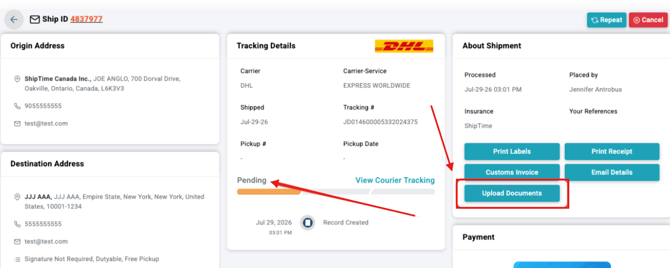
Step 3: Upload Your Document
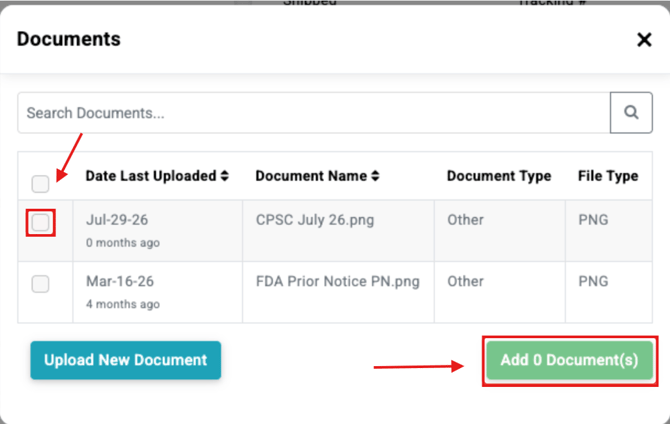
Select Upload Documents.
You can:
- Select a document already stored in your ShipTime document library, or
- Upload a new document
Select the applicable file and choose Add Document.
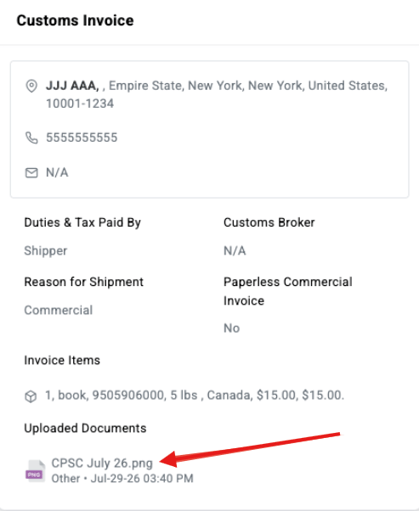
Step 4: Confirm the Upload
Once the document has been successfully attached, ShipTime will display a confirmation.
The uploaded document will also appear with the shipment's customs documentation.
Generally, no.
Additional documents must be uploaded while the shipment remains eligible for document submission. Once the shipment begins tracking and is no longer in the applicable Pending state, the upload option may no longer be available.
For documents that require a tracking number, create the shipment first and upload the document before pickup or drop-off.
Frequently Asked QuestionsIs CPSC eFiling required for every shipment entering the United States?
No.
The requirement applies to imported products that are subject to CPSC certification requirements.
Nonregulated products or products that do not require certification are not automatically subject to certificate eFiling simply because they enter the United States.
Is the CPSC Product Registry required?
No.
The Product Registry is optional. It is particularly useful for businesses that repeatedly import products covered by the same certificate information.
Importers may instead provide the full certificate data through a Full PGA Message Set for each entry.
Does the Product Registry automatically file the information with U.S. Customs?
No.
The Product Registry stores the certificate information, but it does not communicate directly with ACE.
The importer or customs filer must still submit a Reference PGA Message Set identifying the applicable certificate during the customs entry process.
Should I upload my CPC or GCC to ShipTime if I use the Product Registry?
Upload supporting documentation to ShipTime when required or requested for your courier or brokerage workflow.
Using the CPSC Product Registry does not itself require you to upload the certificate document to ShipTime.
The important requirement is that the appropriate certificate data or Product Registry reference is correctly transmitted through the CPSC PGA Message Set.
Can ShipTime tell me which certificate my product requires?
No.
ShipTime can help you attach documents to an eligible shipment but cannot determine:
- Whether your product is CPSC-regulated
- Whether a CPC or GCC is required
- Which safety rules apply
- Which testing is required
- Whether your certificate meets CPSC requirements
For regulatory questions, use official CPSC resources or work with your customs and compliance professionals.
Does my courier tracking number need to appear on the CPSC certificate?
A courier tracking number is not listed as one of the required CPSC certificate data elements.
However, using the tracking number in the filename or on a separate cover document can make it easier to associate supporting documentation with the correct shipment.
Example:
CPSC-Certificate-Tracking-123456789012.pdf
What Happens If Required CPSC Information Is Missing?
Incomplete or incorrect CPSC information can result in additional review, examination, clearance delays, or other enforcement action.
CPSC's eFiling program allows the agency to receive certificate information before products enter U.S. commerce and use that information as part of its import-safety review.
Need Help With ShipTime Document Uploads?If you need help attaching an existing compliance document to an eligible ShipTime shipment, contact our Heroic Support™ team. We can help you locate the document-upload tools and review the shipment workflow.
For questions about whether your product requires CPSC certification or how to complete CPSC eFiling, refer to the official CPSC eFiling guidance or contact CPSC’s eFiling support team at eFilingSupport@cpsc.gov.
Not using ShipTime yet? Create a free ShipTime account to compare discounted shipping rates from multiple leading couriers in one place.