
Processing Time is an optional setting that lets you add extra days to the transit times shown to customers at checkout.
This is useful if you need additional time to prepare, package, or fulfill an order before the carrier’s transit time begins.
When Processing Time is enabled, customers see the adjusted delivery estimate at checkout. After the order syncs to ShipTime, the shipment will still show the carrier’s regular transit time.
Enable or update Processing Time
- Log in to your ShipTime account.
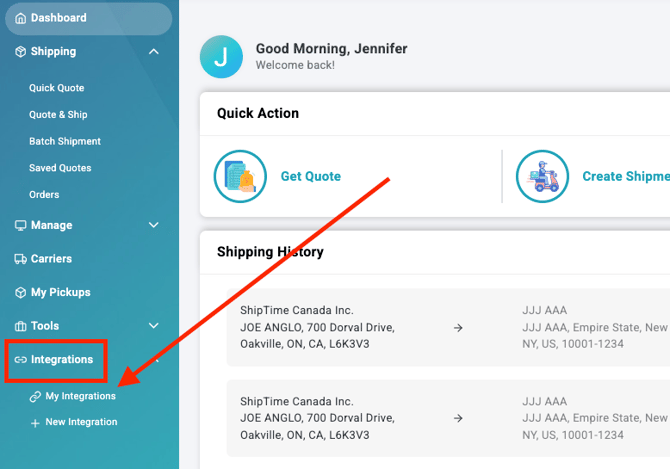
- Go to Integrations > My Integrations.
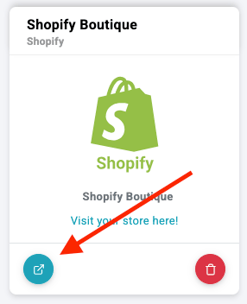
- Find the store you want to update and select Manage Store.
- If Real-Time Rates are not already enabled, select Enable Rates.
- If Real-Time Rates are already enabled, select the edit icon beside Processing Time (days).
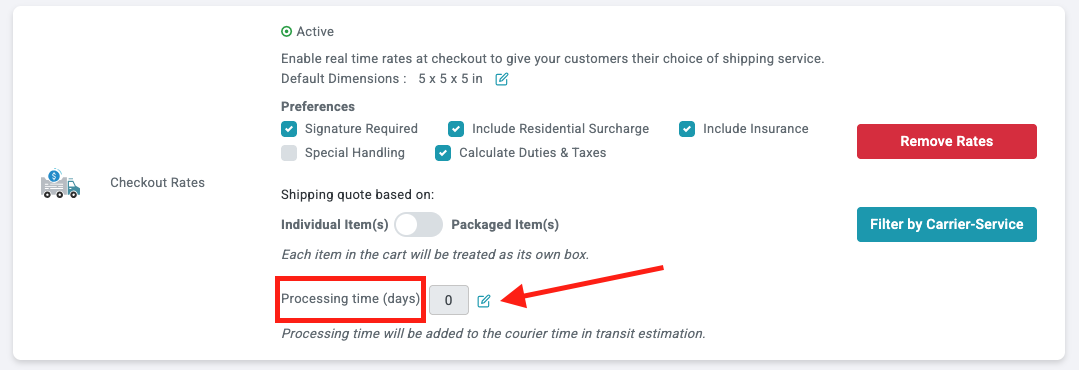
- Enter the number of processing days you want added to the transit times shown at checkout.
- Select Save.

-
Review your Real-Time Rate settings
If you are enabling Real-Time Rates at the same time, review the rest of your rate settings. - Select Enable to apply the updated settings.
A confirmation message should appear once the configuration has been saved.

What customers will see
Customers will not see a separate Processing Time message or fee at checkout.
Instead, the additional processing days are included in the transit time displayed with the shipping option.
For example, if a carrier service normally shows a 2-day transit time and you add 1 processing day, the customer-facing transit estimate will include that additional day.
What you will see in ShipTime
Processing Time changes the transit estimate displayed to your eCommerce customers.
Once the order syncs into ShipTime, you will still see the carrier’s regular transit time for the shipment rather than the customer-facing adjusted estimate.
Need help?
If you have trouble configuring Processing Time or Real-Time Rates for your eCommerce integration, contact our Technical Support team at techsupport@shiptime.com.
Not using ShipTime yet? Create your free ShipTime account to access discounted rates from leading couriers, all in one platform.