
ShipTime’s Bring Your Own Rates (BYOR) feature allows you to connect your own negotiated courier accounts and compare those rates alongside ShipTime’s discounted rates.
With Dual Quoting, you can see both options within the same ShipTime quote and choose which rate works best for your shipment.
What is BYOR?
Bring Your Own Rates (BYOR) is designed for businesses that already have negotiated rates with supported couriers such as FedEx, UPS, Purolator, Canada Post, and others.
Once your courier account is connected to ShipTime, you can quote and ship using your own rates while continuing to access ShipTime’s discounted courier rates.
How does Dual Quoting work?
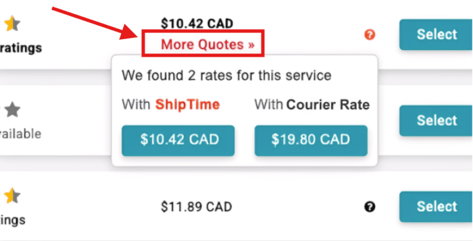
When you have an eligible BYOR account connected, ShipTime can display:
- your negotiated BYOR rate
- ShipTime’s discounted rate
- a clear indication of which rate is currently selected
- a More Quotes option to view and switch between available rates
Depending on your rate display preference, ShipTime can also automatically select the lowest available rate.
What are the rate display options?
You can choose how ShipTime handles your BYOR and ShipTime rates.
Dynamic – Default
ShipTime automatically selects the lowest available rate, whether that rate comes from your connected BYOR account or ShipTime’s discounted rates.
You can still use More Quotes to review other available options.
Always Use My Rate
Your connected BYOR rate is selected by default, even if a ShipTime discounted rate is lower.
The ShipTime rate can still be viewed by selecting More Quotes.
How do I change my BYOR rate preference?
You can change your rate display preference from your ShipTime settings.
- Sign in to ShipTime.
- Go to Settings > Preferences & Defaults.
- Locate the BYOR rate display preference.
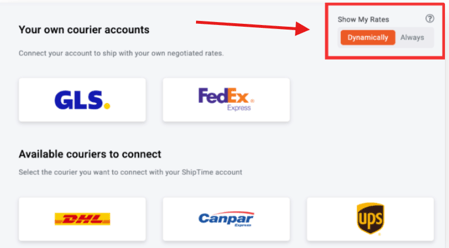
- Select Dynamic or Always Use My Rate.
- Save your changes.
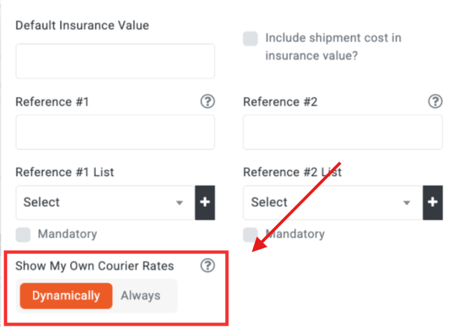
You may also be able to manage this preference from the Carriers page.
What happens when I select a BYOR rate?
When you select your own BYOR rate, the shipment is processed using your connected courier account and your contracted courier pricing.
Because the shipment is moving under your own courier agreement, support for the courier service, billing, claims, and shipment-related issues is handled directly with that courier rather than through ShipTime’s Heroic Support™ team.
ShipTime can still help with questions related to using the ShipTime platform or your BYOR connection.
What happens when I select a ShipTime rate?
If you select a ShipTime discounted rate, the shipment is processed using ShipTime’s courier pricing and support structure.
If you need help reviewing your BYOR setup, comparing available rates, or using Dual Quoting, contact our Heroic Support™ team.
Not using ShipTime yet? Create your free ShipTime account to access discounted rates from leading couriers, all in one platform.