
When Real-Time Rates are enabled, customers can see the courier services available through your ShipTime account at checkout, including eligible BYOR carrier accounts.
How you limit those services depends on your eCommerce platform.
Shopify and WooCommerce
If you use Shopify or WooCommerce, you can choose which carrier services appear at checkout without disabling the carrier entirely in ShipTime.
Use the carrier preference settings for your integration to select only the services you want customers to see.
For setup instructions, see the related articles:
- How Do I Set Carrier Preferences for Shopify Real-Time Rates?
- How Do I Set Carrier Preferences for WooCommerce Real-Time Rates?
Disable a carrier in ShipTime
If you need to disable a carrier at the ShipTime account level:
- Log in to your ShipTime account.
- From the left-hand menu, select Carriers.
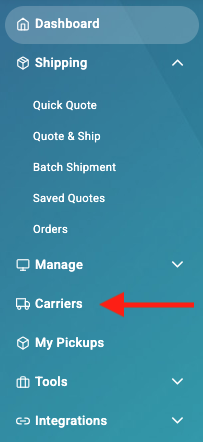
- Find the carrier you want to disable.
- Turn off the toggle beside that carrier.
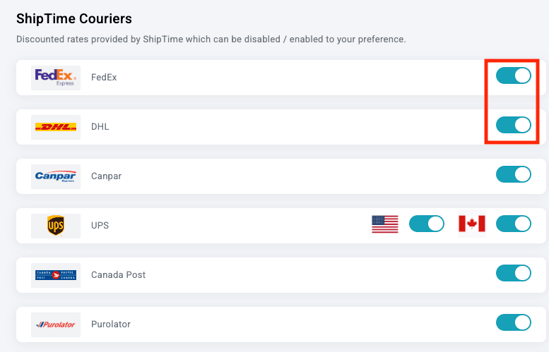
The carrier will no longer be included in your available quoting options.
Important: disabling a carrier affects more than eCommerce
Disabling a carrier from the Carriers page affects your ShipTime account as a whole.
That carrier will also no longer be available for regular Quote & Ship shipments.
If you only want to control which services customers see at checkout, use the platform-specific carrier preferences for Shopify or WooCommerce instead of disabling the carrier globally.
What about freight and pallet services?
Freight carriers and pallet services are not available through Real-Time Rates at eCommerce checkout.
Palletized or oversized orders can instead be quoted and shipped from the Orders page in ShipTime using a pallet.
Need help?
If you have trouble managing carrier availability or configuring your eCommerce Real-Time Rates, contact our Technical Support team at techsupport@shiptime.com.
Not using ShipTime yet? Create your free ShipTime account to access discounted rates from leading couriers, all in one platform.