
Handling fees let you adjust the shipping rates displayed to customers at checkout. You can increase rates to help cover additional costs or decrease them to offer a shipping discount.
Handling fees are available through eCommerce integrations that use Real-Time Rates. Real-Time Rates are currently available only for Shopify, WooCommerce, and Ecwid.
Enable handling fees
- Log in to your ShipTime account.
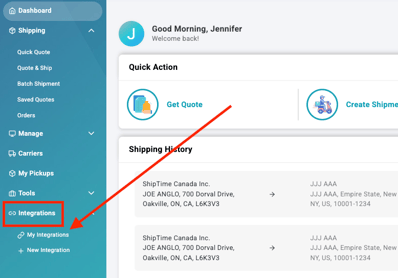
- Go to Integrations > My Integrations.
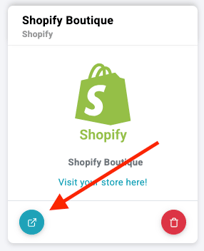
- Find the store you want to update and select Manage Store.
- If Real-Time Rates are not already active, select Enable Rates.
If Real-Time Rates are already enabled, continue to the handling fee settings. - Under Handling Fees, select Enable.

Configure your rate settings
Before applying the handling fee, review the available rate settings.
Default package dimensions
Enter default package dimensions to use when product dimensions are unavailable.
Accurate product dimensions are recommended whenever possible, as default dimensions may result in less precise checkout rates.
Shipping preferences
Select any preferences you want to apply, including:
- Signature Required
- Residential Surcharge
- Insurance Coverage
Quoting method
Choose whether rates should be calculated using:
- Individual Items, or
- Package Items
Handling fee adjustment
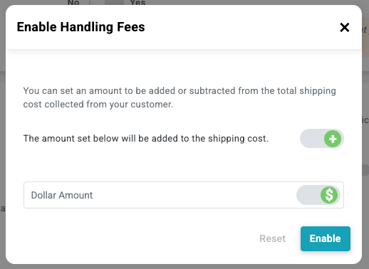
Turn on the handling fee option, then choose how you want to adjust the displayed shipping rate.
You can use:
- A fixed dollar amount ($) or a percentage (%)
- A positive value to increase the rate
- A negative value to decrease the rate
For example, you could add a fixed amount to help cover packaging costs or apply a negative percentage to offer customers a shipping discount.
Save your settings
Select Enable to apply your changes.
A confirmation message should appear once the settings have been saved, and the adjusted shipping rates will be displayed at checkout.

How handling fees appear to customers
Customers will not see a separate handling fee at checkout.
Instead, they will see only the final shipping rate after your handling fee adjustment has been applied.
Why use handling fees?
Handling fee adjustments can help you:
- Cover additional costs: Account for packaging, processing, or other shipping-related expenses.
- Offer shipping discounts: Reduce the displayed shipping rate as part of a promotion.
- Control checkout pricing: Adjust the rates shown to customers based on your business needs.
Need help?
If you have trouble enabling handling fees or configuring your Real-Time Rates, contact our Technical Support team at techsupport@shiptime.com.
Not using ShipTime yet? Create your free ShipTime account to access discounted rates from leading couriers, all in one platform.