
ShipTime can send tracking and confirmation emails for your shipments. You can enable these notifications when creating a shipment, save them for specific contacts in your Address Book, or set account-wide defaults under Settings > Preferences & Defaults.
Enable tracking emails when creating a shipment
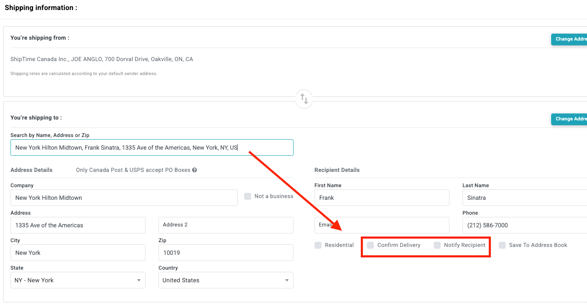
When creating a shipment, use the Notification and Confirmation Emails option in the From and To sections.
This allows shipment notifications to be sent for that specific shipment.
Set default notifications for an Address Book contact
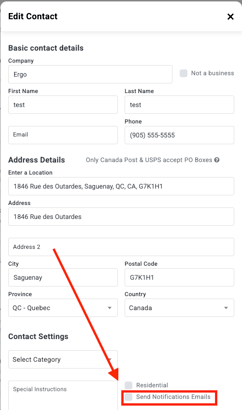
You can save email notification preferences for individual contacts in your Address Book.
When a default notification preference is saved for a contact, ShipTime can use that setting for future shipments to that address.
Set account-wide tracking defaults
You can also set the default tracking notification preferences for your ShipTime account.
- Go to Settings > Preferences & Defaults.
- Go to the Email Notifications section.
- Select the default options you want ShipTime to use for future shipments.
- Save your changes.
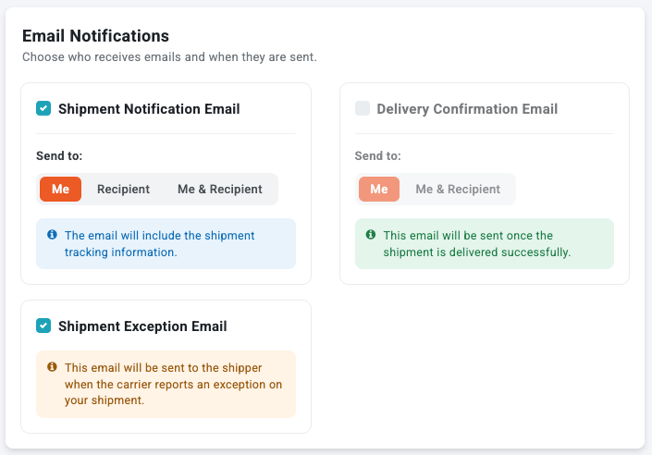
These defaults can help reduce repetitive setup when you regularly use the same tracking notification preferences.
Why use tracking emails?
Tracking and confirmation emails can help you:
- Stay informed: Receive shipment updates by email.
- Confirm shipment activity: Get notifications related to shipment processing and delivery.
- Save time: Set defaults for your account or frequently used contacts.
Need help?
If you need help setting up tracking or confirmation emails in ShipTime, contact our Heroic Support™ team.
Not using ShipTime yet? Create your free ShipTime account to access discounted rates from leading couriers, all in one platform.