
If your Ecwid store is already connected to ShipTime, you can enable Real-Time Rates from your integration settings.
Real-Time Rates allow your customers to see available shipping options and costs directly at checkout based on their order details.
Enable Real-Time Rates in ShipTime
- Log in to your ShipTime account.
- Go to Integrations > My Integrations.
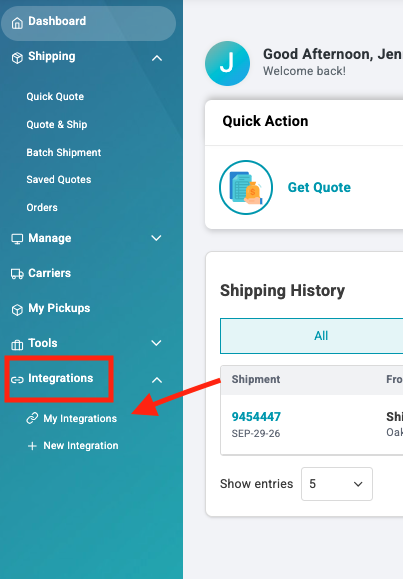
- Find your connected Ecwid store and select Manage Store.
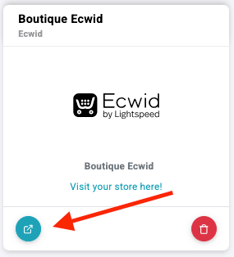
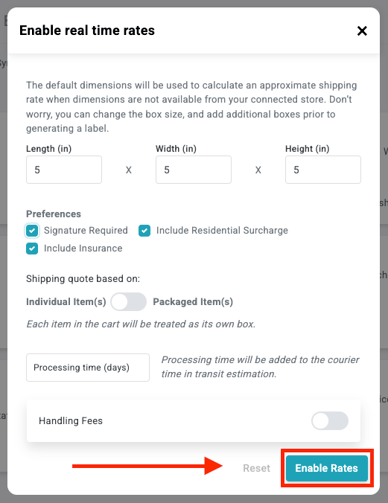
- Select Enable Rates.

- Enter your default package dimensions.
These dimensions are used only as a fallback when dimensions are missing from a product in Ecwid. - Review and select any additional rate preferences you want to use.
- Select Enable Rates to save your settings.
Once enabled, you should see a confirmation message indicating that live rates were enabled successfully.
Add dimensions to your Ecwid store
For the most accurate Real-Time Rates, make sure your Ecwid products have the correct dimensions entered.
- Log in to your Ecwid Dashboard
- Go to Catalog - Products
- Select the product you want to update, then select Edit

- Go to the Shipping & Pickup section
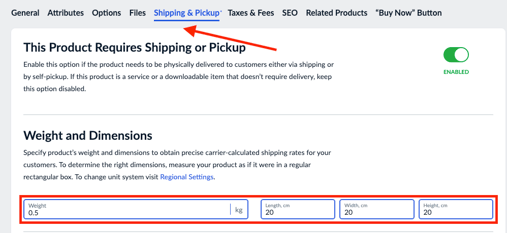
- Enter the product dimensions
- Save and close
- Repeat the steps for each product in your store
Why product dimensions matter
Accurate product dimensions help ShipTime calculate more precise shipping rates at checkout.
If dimensions are missing, ShipTime may use the default dimensions saved in your integration settings, which may not accurately represent the products in the order.
Test your checkout rates
After enabling Real-Time Rates, place a test order in your Ecwid store to confirm that shipping options appear at checkout.
If rates do not display, check that:
- Real-Time Rates are enabled for the integration.
- Product weights and dimensions are available.
- Your default dimensions are entered.
- The destination can be serviced by the available carriers.
Need help?
If you have trouble enabling Real-Time Rates or displaying shipping options in your Ecwid store, contact our Technical Support team at techsupport@shiptime.com.
Not using ShipTime yet? Create your free ShipTime account to access discounted rates from leading couriers, all in one platform.