
The Require Package Dimensions setting controls whether you must enter package dimensions when shipping orders from your eCommerce integration.
By default, this setting is turned on. If you turn it off, you can ship using only the package weight.
Important information about dimensional weight
Turning off Require Package Dimensions does not guarantee the quoted shipping rate.
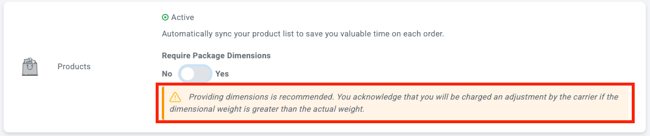
Couriers may assess the shipment using dimensional weight, based on the package’s physical size and weight. If the courier-assessed dimensional weight is higher than the weight entered in ShipTime, additional charges may apply.
You are responsible for any carrier adjustments billed to your account.
Update the package dimensions setting
- Log in to your ShipTime account.
- Go to Integrations > My Integrations.
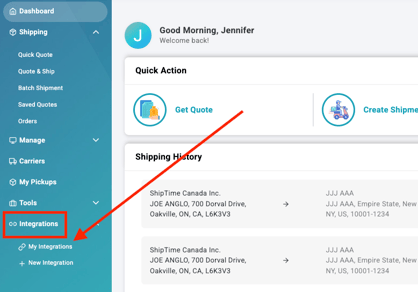
- Find the eCommerce store you want to update and select Manage Store.

- Go to the Products section.
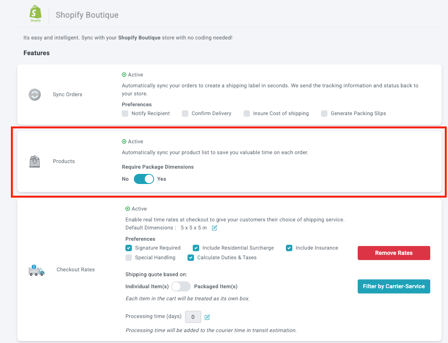
- Find Require Package Dimensions.
By default, the setting is Yes. Leave it set to Yes if you want package dimensions to be required.
If you select No, ShipTime will display a warning about possible rate adjustments.
When should I leave this setting enabled?
Keeping Require Package Dimensions set to Yes is recommended when you want ShipTime to use package dimensions for more accurate rate calculations.
When might I turn it off?
You may choose No if you need to process shipments quickly using only the package weight.
Keep in mind that the carrier may later adjust the charge if the actual package dimensions result in a higher dimensional weight.
Need help?
If you have questions about the Require Package Dimensions setting or your eCommerce integration, contact our Technical Support team at techsupport@shiptime.com.
Not using ShipTime yet? Create your free ShipTime account to access discounted rates from leading couriers, all in one platform.