
If a shipment has not been used, you may be able to cancel it directly from your ShipTime account while the Cancel option is still available.
How do I cancel a shipment?
- Sign in to your ShipTime account.
- From the left-hand menu, go to Manage > History & Tracking.
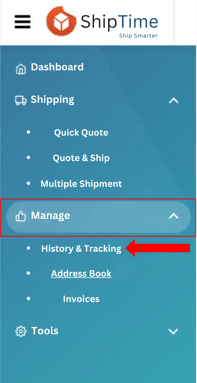
- Search for the shipment or locate it in the shipment list.
- In the Action column, select the red Cancel button.
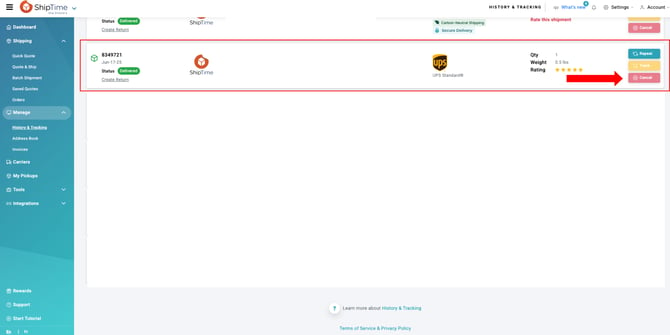
The cancellation option is available directly in your account on the same day the shipment is created.
What if I need to cancel the shipment after the creation date?
If the Cancel option is no longer available, please contact our Heroic Support™ team so we can review the shipment and assist with the cancellation.
Most eligible unused shipments can be submitted for cancellation within 90 days of their creation date.
After 90 days, ShipTime is unable to refund the shipping charges.
Are there different cancellation deadlines for USPS and FedEx US?
Yes.
USPS and FedEx US shipments must be cancelled within 30 days of the shipment creation date.
After 30 days, these shipments are no longer eligible for a refund, even if the label was not used.
Cancellation deadlines at a glance
| Shipment | Cancellation / Refund Window |
|---|---|
| Eligible unused shipments | Cancel directly from History & Tracking while the option is available |
| Most unused shipments requiring support assistance | Contact Heroic Support™ within 90 days |
| USPS shipments | Within 30 days |
| FedEx US shipments | Within 30 days |
| Most shipments over 90 days old | Shipping charges are no longer refundable |
What if I cannot cancel the shipment?
If the Cancel option is unavailable or you are unsure whether the shipment is still eligible for cancellation, contact our Heroic Support™ team with your ShipID.
We can review the shipment and confirm the available options.