
After you complete your shipment in ShipTime, you can confirm that it was successfully created by checking for your ShipID, tracking number, and shipping label.
Complete the shipment
After entering your shipment details and selecting a carrier, continue to Finalize & Pay and complete the payment process.
Once the shipment has been successfully created, ShipTime will generate the shipment information and label.
How do I know the shipment was created?
A successfully created shipment will generally include:
- ShipID – ShipTime’s unique identifier for the shipment
- Tracking number – the carrier tracking number assigned to the shipment
- Shipping label – the label that must be attached to the package
- Pickup confirmation – when applicable, details for a pickup scheduled through ShipTime
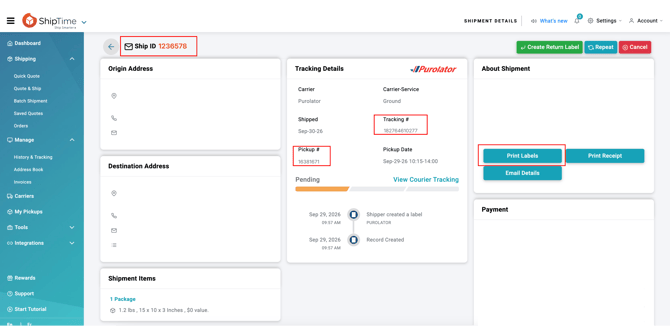
You can download or print the shipping label from this screen and prepare the package for pickup or drop-off.
Can I check the shipment later?
Yes.
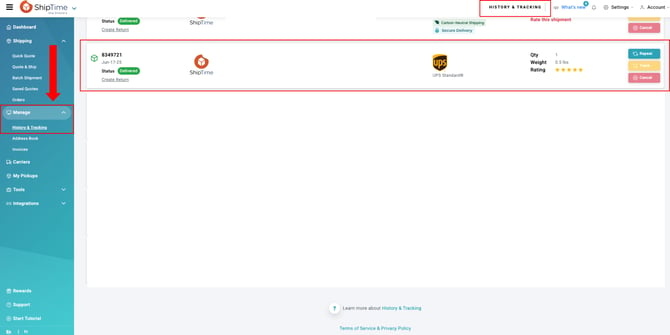
Go to Manage > History & Tracking to locate previously created shipments.
You can search for the shipment using information such as:
- ShipID
- tracking number
- recipient name
From the shipment details, you can review the tracking information and access available shipment documents.
Does a tracking number mean the carrier has the package?
Not necessarily.
A tracking number confirms that the shipment and carrier label were created, but it does not necessarily mean that the carrier has physically received or scanned the package yet.
Tracking activity normally begins after the shipment is picked up, dropped off, or receives its first carrier scan.
If the shipment has not yet received a carrier scan, tracking may temporarily show limited information.
What if I scheduled a pickup?
If a pickup was requested during shipment creation, review the available pickup details or confirmation information associated with the shipment.
A scheduled pickup does not mean the package has already been collected. Continue monitoring the carrier tracking once the package has been handed over.
What if I do not see a ShipID or shipping label?
If the shipment did not complete successfully or you cannot locate a generated label, avoid creating the shipment again until you confirm whether the original transaction was completed.
Check History & Tracking first. If you are still unsure, contact our Heroic Support™ team so we can help confirm the shipment status and prevent an accidental duplicate shipment.