
When shipping an item internationally for a return or repair, it is important to identify the reason for shipment correctly and provide complete customs information.
Clearly identifying the shipment and providing supporting documentation can help customs authorities determine the appropriate treatment and reduce the risk of clearance delays.
Step 1: Start Your ShipmentBegin creating your shipment in ShipTime by entering the origin, destination, package details, and other required information.
Continue until you reach the International Details page.
Step 2: Select Return and RepairUnder Additional Details, locate the Reason for Shipment field.
Select:
Return and Repair
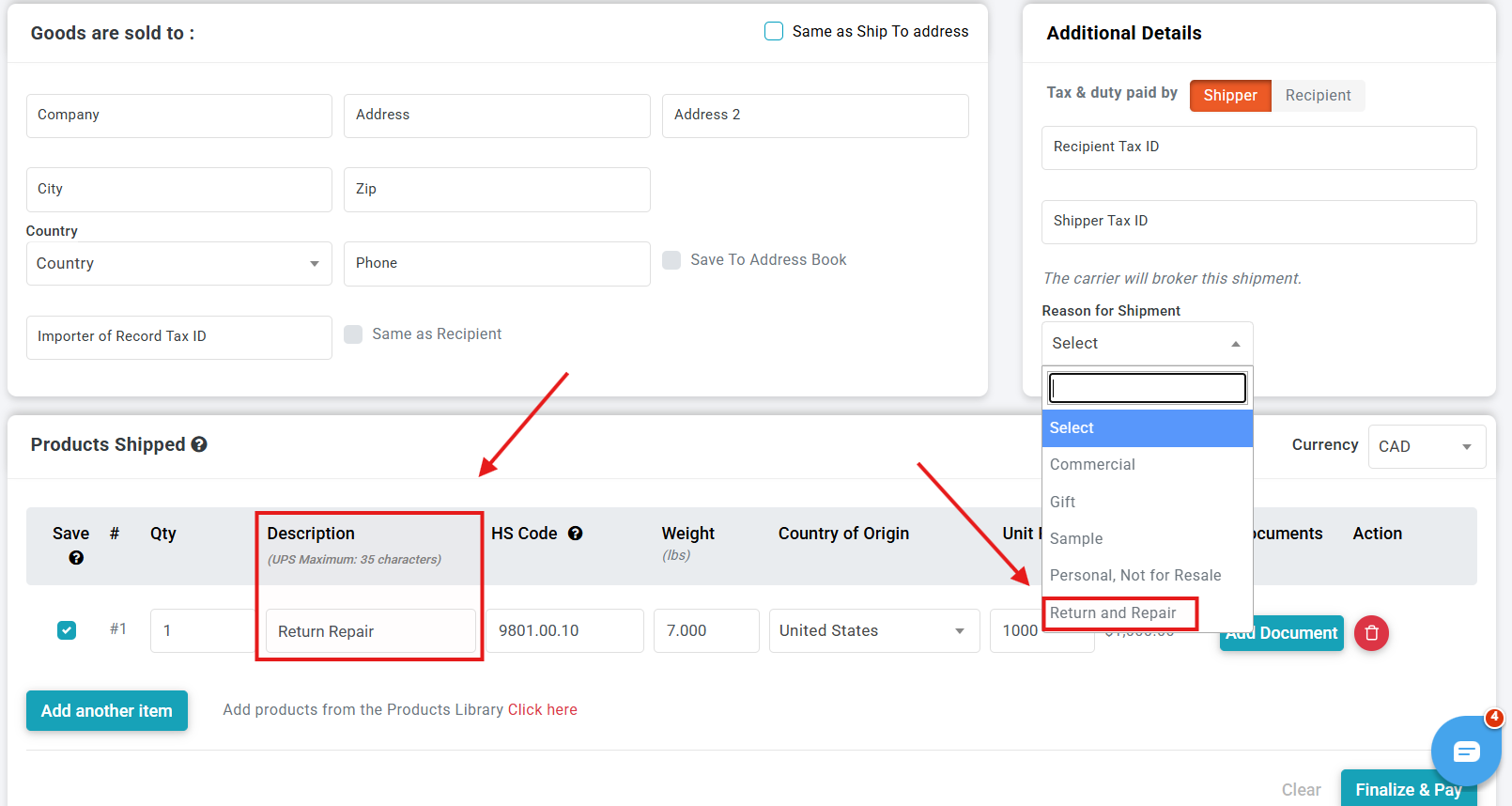
Selecting the correct reason for shipment helps identify the purpose of the goods to the courier and customs authorities.
Step 3: Complete the Product InformationImportant: Selecting Return and Repair does not automatically exempt the shipment from duties, taxes, brokerage, or other customs charges. Eligibility for any special customs treatment is determined by the applicable customs authority and depends on the circumstances of the shipment and supporting documentation.
Complete the required customs information for each different product in the shipment.
This includes:
- Quantity: Enter the number of units for that product.
- Product Description: Clearly describe the item being returned or repaired.
- HS Code: ShipTime will provide the applicable classification where supported.
- Country of Origin: Enter where the product was originally manufactured or produced.
- Unit Price: Enter the current value of each item being shipped.
Do not enter a value of $0 simply because the item is not being sold. Customs authorities generally require a value for imported goods even when there is no commercial sale.
Product Description
When Return and Repair is selected, ShipTime automatically adds:
Return & Repair for -
Enter a clear description of the actual product after this text.
For example:
Return & Repair for - industrial pressure sensor
Avoid vague descriptions such as:
- Parts
- Equipment
- Electronics
- Return
- Repair item
A clear description helps the courier and customs authority understand exactly what is being shipped.
HS Code
For applicable transborder shipments between Canada and the United States, ShipTime may automatically populate the HS code when Return and Repair is selected.
Where this applies, the HS code field will be locked to help ensure the appropriate return/repair customs classification is used.
Step 4: Add Supporting DocumentsReturn and repair shipments often require evidence showing the history and purpose of the goods.
Supporting documents may include:
- Original commercial invoice
- Original shipping label or tracking information
- Purchase receipt
- Return Merchandise Authorization (RMA)
- Warranty documentation
- Repair authorization
- Manufacturer or repair facility documentation
- Proof that the same goods were previously exported
For couriers that support electronic customs documentation, upload the applicable documents within the International Details section.
If electronic document submission is not supported for the selected courier, print the required documents and securely attach them to the shipment as instructed.
Why Is Proof of the Original Shipment Important?Customs authorities may need evidence that the product was previously exported or imported before granting special treatment to returned or repaired goods.
For example, U.S. customs provisions distinguish between goods that are simply returned without being advanced in value and U.S. goods that were temporarily exported for repair or alteration.
For qualifying U.S. goods returned after repairs abroad, certain HTS provisions can allow duties to be assessed on the value of the foreign repair or alteration rather than the full value of the product. Additional declarations and supporting records may be required.
Canada also has specific provisions for goods returning after repair. For example, qualifying goods returned to Canada after repair or alteration in certain free-trade partner countries can receive customs duty relief, although GST/HST may still apply to the value added by the repair in some circumstances.
Because requirements vary by country and circumstance, always keep documentation from the original shipment and repair transaction.
Step 5: Review the Consignee InformationBefore completing the shipment, make sure the recipient or consignee information is complete and accurate.
This should include:
- Full recipient or company name
- Complete delivery address
- Phone number
- Email address
The recipient may be contacted by the courier, customs broker, or customs authority to verify information or provide additional documentation during clearance.
Step 6: Review and Complete Your ShipmentReview all shipment information before proceeding to Finalize & Pay.
The shipper is responsible for providing accurate customs information and ensuring any required supporting documentation is included.
Customs requirements vary by destination, so additional information may be requested even when the shipment is correctly identified as a return or repair.
After ShippingTrack international return and repair shipments closely after they are picked up.
Customs or the carrier may request additional information during clearance. Responding quickly can help prevent unnecessary delays.
A return or repair shipment may also still be subject to:
- Duties or taxes
- Brokerage charges
- Entry preparation fees
- Customs processing fees
- Other destination-country charges
These charges can apply even when the goods are not being sold.
Tips for Return & Repair ShipmentsTo help avoid customs delays:
- Select Return and Repair as the correct Reason for Shipment.
- Provide a detailed description of each product.
- Enter the correct country of origin.
- Declare an accurate value rather than $0.
- Keep the original invoice, label, tracking number, or other proof of prior shipment.
- Include an RMA, repair authorization, or warranty documentation where applicable.
- Make sure recipient contact information is complete.
- Monitor tracking and respond promptly if the carrier requests additional customs information.
If you're unsure how to enter a return or repair shipment in ShipTime or a courier has requested additional customs documentation, contact our Heroic Support™ team. We can help you review the shipment details and clarify what information the carrier is requesting.
Not using ShipTime yet? Create a free ShipTime account to compare discounted shipping rates from multiple leading couriers in one place.