
If an international shipment has already been created, ShipTime may allow you to upload additional customs documents before the shipment is handed to the carrier.
This can be useful for documents that are only available after a tracking number has been generated, such as FDA Prior Notice documentation.
When can I upload documents to an existing shipment?
Additional documents can be uploaded when:
- the shipment has already been created
- the carrier supports additional electronic document uploads
- the shipment has not yet been picked up or dropped off
- the Upload Documents option is still available for the shipment
Once the shipment has entered the carrier network and tracking activity has begun, the option to upload additional documents will no longer be available.
How do I upload a document?
- Sign in to your ShipTime account.
- Go to Manage > History & Tracking.
- Locate and select the pending international shipment.
If the carrier supports additional document uploads, you will see the Upload Documents option.
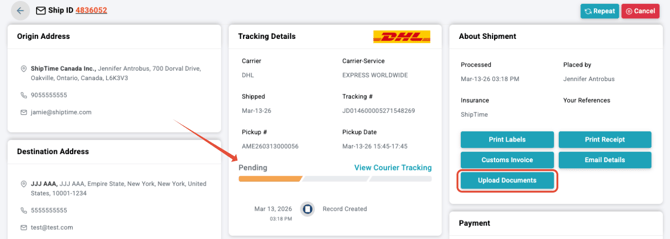
- Select Upload Documents.
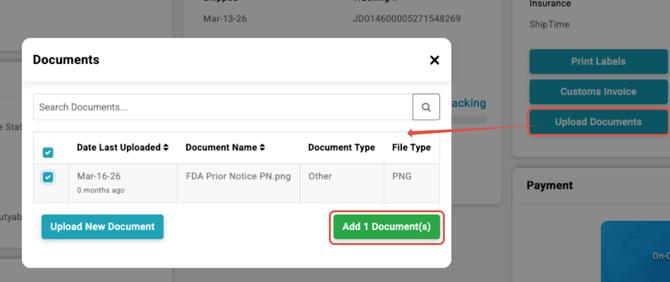
- Choose an existing document from your saved documents or upload a new one.
- Add the document to the shipment.
ShipTime allows you to store documents and reuse them for future shipments when applicable.
How do I know the document was successfully added?
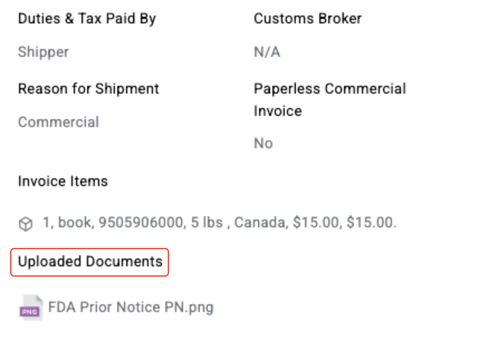
After the document is successfully attached, ShipTime will display a confirmation message.

The attached document can also be viewed in the shipment’s Customs Invoice area.
Which carriers support this feature?
Additional electronic document uploads are currently available for eligible shipments with:
- DHL
- FedEx
- UPS
The Upload Documents option will only appear when the selected carrier and shipment support the feature.
Can I upload a document after giving the shipment to the carrier?
No.
Required documents should be uploaded before the shipment is picked up or dropped off.
Once carrier tracking activity has begun, additional documents can no longer be uploaded through ShipTime and the Upload Documents option will not be displayed.
What about FDA Prior Notice documents?
FDA Prior Notice documentation is one example of a document that may need to be added after the shipment is created because a shipment tracking number may be required first.
If Prior Notice applies to your shipment, complete the applicable FDA process and then upload the resulting document to the ShipTime shipment before handing it to the carrier.
For FDA Prior Notice information, refer to the FDA Prior Notice System Interface.
What if I need to add documents while creating the shipment?
If you have the required documents before creating the label, they can be stored and attached during the international shipment setup instead.
See How to Add Customs Documents for International Shipments for instructions.
Need help?
If you have questions about uploading documents to an existing international shipment or whether your shipment supports electronic document submission, contact our Heroic Support™ team.
Not using ShipTime yet? Create your free ShipTime account to access discounted rates from leading couriers, all in one platform.