
The Invoices page lets you search for invoices, review invoice details, make payments when applicable, and access invoice PDFs and receipts.
For customers using a ShipTime Credit Account, the billing cycle runs weekly from 12:01 AM Sunday through midnight Saturday. Invoices are generally generated on Monday night.
There is a delay between shipment creation and invoicing so ShipTime can receive the applicable billing information from the carrier before the charges are included on your invoice.
Use the numbered sections in the screenshots below to learn what each option does.
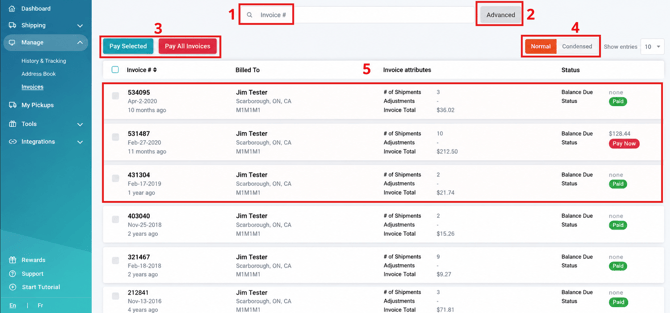
- Search Bar
Search for a specific invoice using the available invoice information. - Advanced Search
Use additional search options to narrow your invoice history and locate a specific invoice. - Pay Invoice Options
Use the available payment options to pay an outstanding invoice when applicable. - View Options
Use the available view controls to manage how invoice information is displayed. - Invoices
Select an invoice from the list to open its detailed invoice information.
Viewing an Invoice
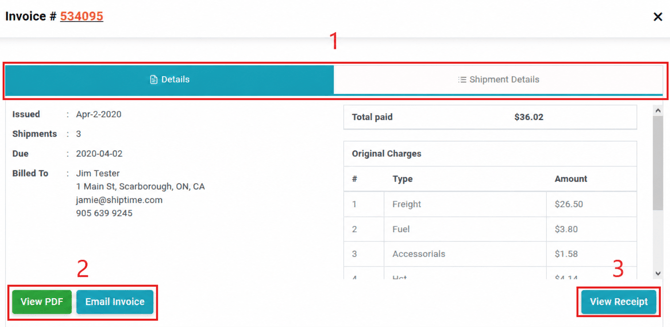
- Details and Shipment Details
Use the available tabs to review:- general invoice information
- shipments and charges included on the invoice
- View or Email Invoice
View the invoice as a PDF or use the available option to send the invoice by email. - View Invoice Receipt
Access the receipt associated with the invoice when available.
Why might an invoice include older shipments?
Shipments are not always invoiced immediately after they are created. ShipTime allows additional time to receive billing information from the carrier before generating the applicable invoice.
As a result, an invoice may contain:
- shipment charges
- carrier adjustments
- duties and taxes
- brokerage or customs charges
- other applicable account charges
Need Help?
If you have questions about an invoice, payment, or charge on your ShipTime account, contact our Heroic Support™ team.