
The Manage Store page lets you review the features available for a connected eCommerce store and manage whether real-time shipping rates are displayed during checkout.
The page also shows the current status of supported integration features, such as order syncing, product syncing, and checkout rates.
Store Features
Depending on your connected eCommerce platform, available features may include:
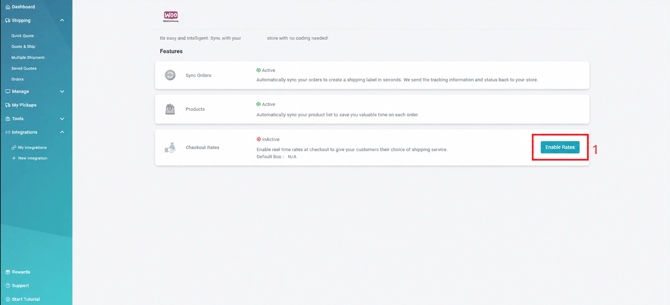
- Sync Orders: Automatically sync orders from your connected store into ShipTime so they can be processed for shipping. Tracking information and shipment status can also be sent back to the store when supported.
- Products: Sync your product information with ShipTime to help reduce repetitive data entry when processing orders.
- Checkout Rates: Provide customers with real-time shipping rates and available shipping services during checkout.
The status shown beside each feature indicates whether it is currently Active or Inactive.
1. Enable or Disable Checkout Rates
Use the available checkout-rate option to control whether real-time shipping rates are provided through your connected store.
- Enable Rates: Activates real-time checkout rates for the integration.
- When checkout rates are active, eligible ShipTime shipping options can be made available to customers during checkout.
- If the feature is inactive, real-time ShipTime rates will not be provided through this integration.
Depending on the integration, additional settings such as a Default Box may also be displayed for checkout-rate calculations.
Need Help?
If you have questions about your store integration, product or order syncing, or enabling checkout rates, contact our Heroic Support™ team.
For technical integration issues, you can also contact techsupport@shiptime.com.