
The Preferences & Defaults page lets you customize how ShipTime behaves when you sign in and create shipments.
You can set default preferences for language, measurement units, international shipping, pickup or drop-off, email notifications, shipment options, insurance values, and your own carrier rates.
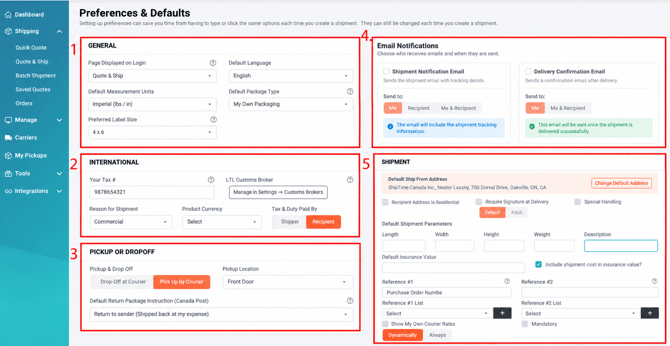
1. General
Use the General section to manage your basic account preferences.
- Page Displayed on Login: Choose which page opens first when you sign in to ShipTime.
- Default Language: Select your preferred account language.
- Default Measurement Units: Choose between Imperial and Metric.
- Default Package Type: Select the package type you use most often.
- Preferred Label Size: Choose your default shipping-label format.
2. International
Use the International section to set defaults for international shipments.
- Your Tax #: Enter the applicable tax identification number.
- LTL Customs Broker: LTL customs broker information is now managed separately from the Customs Broker page under Settings.
- Reason for Shipment: Select the default reason used when creating international shipments.
- Product Currency: Choose the default product currency, such as CAD or USD.
- Tax & Duty Paid By: Choose whether duties and taxes default to Recipient or Shipper.
3. Pickup or Drop-Off
Set your default preferences for getting shipments to the carrier.
- Pickup & Drop-Off: Choose whether shipments default to Drop-Off at Courier or Pick-Up by Courier.
- Pickup Location: Select the default location used for courier pickups.
- Default Return Package Instruction: Choose the default return option if a package is returned. This option applies to Canada Post shipments where available.
4. Email
Choose who should receive default shipment-related emails.
- Shipment Creation Email To: Select whether shipment-creation emails are sent to Me, Recipient, or both.
- Delivery Successful Email To: Select whether successful-delivery notifications are sent to Me or Me & Recipient.
5. Shipment
Use the Shipment section to set defaults that can automatically populate when creating shipments.
- Default Ship From Address: Choose your default origin address.
- Recipient Address is Residential: Set residential delivery as the default.
- Require Signature at Delivery: Automatically request a delivery signature.
- Default Set as Special Handling: Automatically select Special Handling for new shipments.
- Default Shipment Properties: Set your preferred default shipment settings.
- Default Insurance Value: Enter a default Declared Value for insurance.
- Include Shipment Cost in Insurance Value: Choose whether the shipment cost should be included in the insured value.
- Reference #1: Set a default value for the first reference field.
- Reference #2: Set a default value for the second reference field.
- Reference #1 List: Manage available values for Reference #1.
- Reference #2 List: Manage available values for Reference #2.
- Show My Own Carrier Rates: Choose whether ShipTime should always display your connected carrier rates or default to the lowest available rate.
Need Help?
If you have questions about changing your account preferences or shipment defaults, contact our Heroic Support™ team.