
The Shipment Details step of Quote & Ship is where you enter your package information, select shipment options, and choose how you want to proceed to the carrier selection stage.
Use the numbered sections in the screenshot below to learn what each option does.
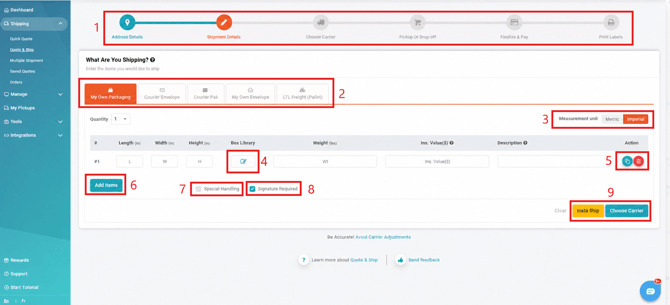
- Shipment Progress Bar
Shows your current step in the shipment process, highlighted in orange. You can select any previous step to return to it and review or update the information entered. - Package Type
Select the package type that best matches what you are shipping. - Measurement Units
Choose the measurement system you want to use:- Metric: kilograms (kg) and centimetres (cm)
- Imperial: pounds (lb) and inches (in)
- Box Library
Select a frequently used package configuration that you previously saved under Settings > Boxes. - Package Action Buttons
Use the available actions to manage an individual package:- Copy: Duplicates the package and adds it as another item to the shipment.
- Delete: Removes the package from the shipment.
- Add Items
Add another package to the shipment. - Special Handling
Select Special Handling when applicable, such as when the shipment is oversized, irregularly shaped, or does not fit into a standard cardboard box.Examples can include tires or other non-standard packaging. - Signature Required
Select this option to request that the carrier obtain a signature from someone at the destination as part of the delivery. - Proceed Options
Choose how you want to continue with the shipment:- Insta Ship: Skips the Choose Carrier screen and automatically selects the least expensive available shipping service.
- Choose Carrier: Takes you to the next screen, where you can review and select from the available carrier and service options.
Need Help?
If you have questions about entering shipment details or selecting the appropriate package and delivery options, contact our Heroic Support™ team.