
Real-Time Rates display ShipTime shipping options directly at checkout on a connected eCommerce store. Customers can choose from the available courier services and rates associated with your ShipTime account, including eligible BYOR rates you have added.
Real-Time Rates are currently available for Shopify, WooCommerce, and Ecwid integrations.
What are Real-Time Rates?
Real-Time Rates calculate and display shipping options during checkout based on details such as the shipment origin, destination, product weight, package dimensions, and your integration settings.
Customers can then choose from the available shipping services before completing their order.
Can I enable Real-Time Rates on my eCommerce store?
Yes, if you use one of the supported integrations:
- Shopify
- WooCommerce
- Ecwid
ShipTime also offers an API for businesses that want to build a custom integration with developer support.
Do I have to use Real-Time Rates?
No.
You can connect a supported eCommerce store to ShipTime without enabling Real-Time Rates. If you prefer to use your own flat-rate shipping settings in your store, you can leave Real-Time Rates turned off.
Your orders can still sync to ShipTime, where you can view available ShipTime rates when you are ready to process the shipment.
How do I enable Real-Time Rates?
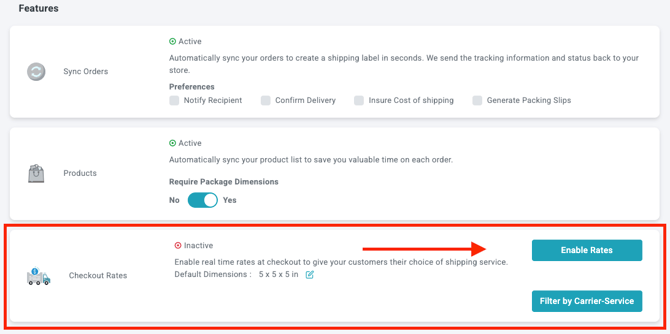
Real-Time Rates can be enabled when connecting a new supported store or from the settings of an existing integration.
Go to Integrations in ShipTime and open the settings for your Shopify, WooCommerce, or Ecwid store. From there, enable Real-Time Rates and complete the required rate settings.
What should I check if Real-Time Rates are not displaying?
First, confirm that Real-Time Rates are enabled for your integration and that all required shipping information has been entered.
The setup can vary by platform, so also confirm that your Shopify, WooCommerce, or Ecwid integration is configured correctly.
For Shopify, your Shopify plan must support third-party carrier-calculated shipping before ShipTime rates can appear at checkout.
If the issue continues, contact our Technical Support team at techsupport@shiptime.com.
Do I need product dimensions for Real-Time Rates?
Yes. Accurate product and package information is important for calculating shipping rates.
At minimum, products need a weight.
Product weights can be stored in your eCommerce platform and synced to ShipTime. You can view synced product information in Settings > Products.
For WooCommerce and Ecwid, the source indicates that length, width, and height can also sync to ShipTime.
For Shopify, product weight can sync, but length, width, and height must be stored in ShipTime.
What happens if product dimensions are missing?
If there is not enough shipment information to calculate a rate, Real-Time Rates may not be available at checkout.
If product length, width, or height is missing, ShipTime can use the default dimensions entered in your integration settings.
These default dimensions may be applied to products in the order, so they may not produce the most accurate rate. For better results, keep your individual product dimensions up to date.
Why do my Real-Time Rates look too high?
One common reason is missing or inaccurate product dimensions.
If individual dimensions are unavailable, ShipTime may use the default dimensions from your integration settings.
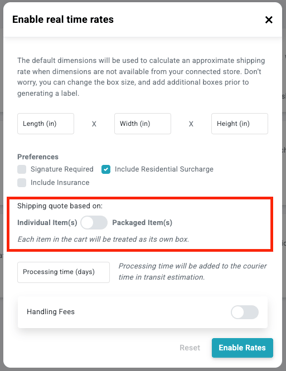
Your packaging method can also affect the rate. If Individual Items is selected, each item may be rated as though it is shipping separately rather than being packed together.
Review your product dimensions, default dimensions, and packaging settings if your checkout rates look higher than expected.
What is the Packaged Items setting?
When configuring Real-Time Rates, you can choose between Individual Items and Packaged Items.
With Packaged Items, ShipTime can calculate rates by grouping multiple products into a box instead of treating each item as a separate shipment.
For this option to work effectively, add the box sizes you regularly use under Settings > Boxes.
ShipTime can then use your saved box library when calculating a shipping rate.
Why are checkout rates different from the rates I see in ShipTime?
When comparing rates, make sure you are using the same:
- Ship-from address
- Destination address
- Product or package dimensions
- Weight
- Shipping preferences
Settings such as Signature Required, Insurance, and Residential Surcharge can also affect the final rate.
For the most accurate comparison, use the same shipment details and preferences in both places.
What should I do if I sell very small items?
For small, lightweight products, accurate weights and dimensions are especially important.
Product weights can be entered in ShipTime to three decimal places, while product dimensions can be entered to one decimal place.
If customers often purchase several small items together, using Packaged Items may provide a more realistic rate by allowing ShipTime to calculate the order as a combined package when possible.
Can Real-Time Rates be used for very large or palletized shipments?
Real-Time Rates cannot be used to quote palletized or oversized shipments at eCommerce checkout.
For these shipments, you can:
- Quote the synced order from the Orders page in ShipTime, selecting a pallet
- Ask customers to contact you for a shipping quote
- Use a flat rate when you already know the expected shipping cost
Need help?
If you have questions about Real-Time Rates, product dimensions, packaging settings, or your eCommerce integration, contact our Technical Support team at techsupport@shiptime.com.
Not using ShipTime yet? Create your free ShipTime account to access discounted rates from leading couriers, all in one platform.