
AVS (Address Verification System) is an additional security measure used when adding or using a credit card in ShipTime.
AVS helps verify that the billing information entered for the card matches the information on file with the card issuer. This helps reduce fraudulent transactions and protect ShipTime accounts.
What information does AVS check?
When adding or using a credit card, ShipTime may require you to confirm the card’s billing address, including:
- street address
- postal code or ZIP code
The information entered should match the billing details associated with the credit card.
What happens if my billing address does not match?
If the billing information does not match the information on file for the card, ShipTime may ask you to review or update the billing address before the card can be used.
Make sure you enter the billing address exactly as it appears with your card issuer.
What happens when I add a new credit card?
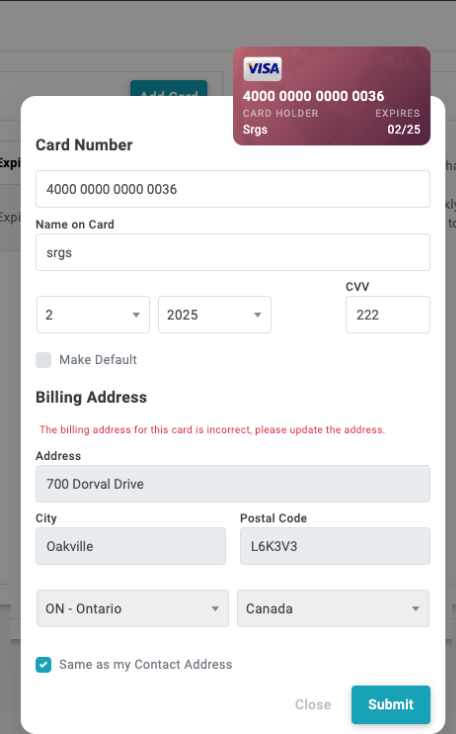
When adding a new credit card, ShipTime validates the billing information provided.
If the billing address cannot be verified, a message will appear asking you to review and update the information before continuing.
Does AVS apply to existing credit cards?
Yes. AVS can also apply to cards that are already saved to a ShipTime account.
If the billing information associated with an existing card is outdated or cannot be verified, you may be asked to reconfirm or update the billing address before using the card.
[SCREENSHOT REQUIRED – AVS message asking an existing customer to reconfirm their credit card billing address]
What should I do if my address is correct but the card is still not accepted?
If you have confirmed that the billing address and postal code or ZIP code are correct but the card is still being declined or cannot be verified:
- confirm the billing information directly with your card issuer
- make sure you are using the billing address associated with that specific card
- check for spelling, formatting, or postal code errors
- try entering the billing information again
If the issue continues, contact our Heroic Support™ team and we can help review what is happening in ShipTime.