
Uber Direct is a local delivery service available through ShipTime for eligible same-day and scheduled deliveries in Canada and the United States.
Uber Direct supports local deliveries of up to:
- 25 km in Canada
- 20 miles in the United States
If the distance between the pickup and delivery locations exceeds these limits, Uber Direct will not appear as an available quote in ShipTime.
What are the main features of Uber Direct?
Depending on the shipment and service area, Uber Direct can offer:
- same-day or scheduled local delivery
- live tracking
- seven-day-a-week availability in supported areas
- recipient text notifications
- signature and adult signature options
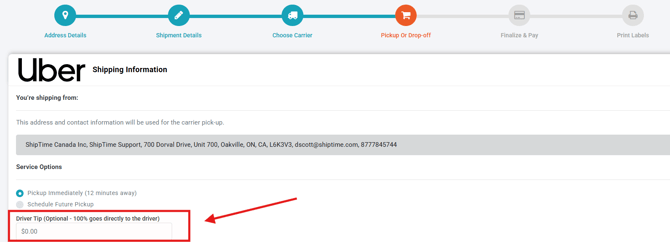
- driver tipping through ShipTime
- availability for eligible connected eCommerce stores
Availability, pricing, and delivery timing depend on the pickup and delivery locations and the shipment details.
How do I schedule an Uber Direct pickup?
When creating an eligible shipment in ShipTime:
- Enter the pickup and delivery addresses.
- Review the available courier quotes.
- Select Uber Direct if it appears.
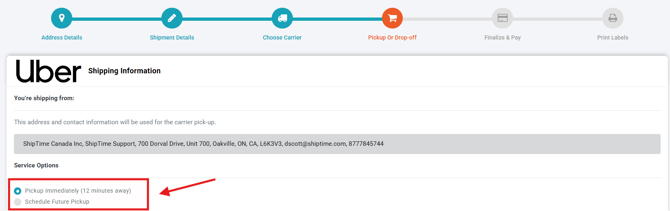
- Continue to the Pickup / Drop-Off step.
- Choose an immediate or future pickup option, when available.
- Review the pickup details and complete the shipment.
For immediate pickups, ShipTime may display an estimated driver arrival time.
Make sure the package is fully packed, sealed, and ready before the driver arrives.
Why isn’t Uber Direct appearing in my quotes?
Uber Direct may not appear as an available option if:
- the delivery distance exceeds 25 km in Canada*
- the delivery distance exceeds 20 miles in the United States*
- the pickup or delivery location is outside an eligible Uber Direct service area
- the shipment details do not meet the service requirements
- Uber Direct is not available for the selected location or timing
*Uber can dynamically adjust this limit based on real-time operating conditions. Factors such as driver availability, store operating hours, and geographical barriers (including bridges, toll roads, and borders) can result in a lower effective delivery radius for a specific request
What size package can I send?
Uber Direct shipments must be suitable for transport in a standard midsize vehicle.
As a general rule, the package should fit comfortably in the trunk of a midsize car.
Always make sure the shipment is:
- securely packaged
- fully closed and sealed
- ready for pickup
- within the applicable Uber Direct size and weight requirements
Can I add a tip for the driver?
Yes, when the option is available in ShipTime.
You can add a tip during the pickup or delivery setup, and the amount will be collected with the shipment payment.
Can I cancel an Uber Direct shipment?
You may be able to cancel an Uber Direct shipment before a driver is assigned.
Once a driver has accepted the shipment and is dispatched to the pickup location, cancellation may no longer be available and the shipment may become non-refundable.
Always review the current shipment status before attempting to cancel.
How does the recipient know the shipment is coming?
Uber Direct can send the recipient text-message updates about the delivery.
These may include:
- a live tracking link
- the driver’s name
- driver contact information
- an estimated delivery time
What can’t I send with Uber Direct?
Uber Direct does not accept certain restricted or prohibited items.
These can include:
- people or animals
- illegal goods
- firearms, weapons, ammunition, and related parts
- cannabis products
- certain medications, pharmaceutical products, vitamins, or supplements
- money, gift cards, lottery tickets, or transferable securities
- recreational drugs, drug paraphernalia, or tobacco products
- dangerous or hazardous goods
- stolen goods
- fragile items
- certain regulated species or animal materials
- items you are not authorized to send
Because restricted-item rules can change, always review the current requirements before shipping.
What if the driver refuses my package?
A driver may refuse a shipment if the package does not meet Uber Direct requirements.
This can include issues related to:
- size
- weight
- packaging
- restricted contents
- suitability for transport
If the driver cannot accept the package, the shipment may be cancelled. Refund eligibility depends on the circumstances.
What happens if the package can’t be delivered?
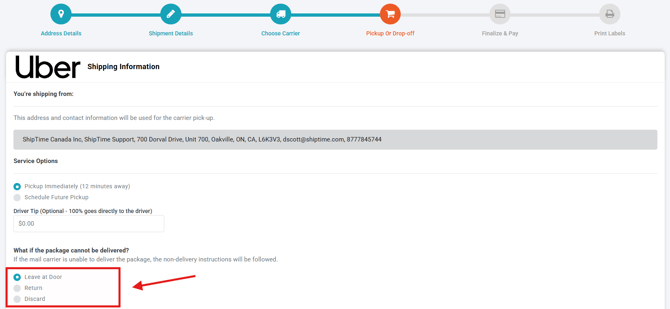
When creating the shipment, you may be able to choose what should happen if delivery cannot be completed.
Depending on the shipment and signature requirements, available options may include:
- leave at the delivery location
- return to sender
- another available delivery instruction
If a return is required, additional return charges may apply.
When a signature is required, leaving the package unattended may not be available.
How do I track my Uber Direct shipment?
Once the shipment is created, you can access live delivery information through ShipTime.
You can also:
- Go to History & Tracking.
- Open the applicable Uber Direct shipment.
- Review the latest tracking details.

The recipient may also receive a live tracking link by text message.
What if my package is lost or damaged?
If there is an issue with an Uber Direct shipment, contact our Heroic Support™ team so we can review the delivery details and available next steps.
If eligible ShipTime Insurance was added to the shipment, a claim may be available subject to the applicable coverage terms.
Not using ShipTime yet? Create your free ShipTime account to access discounted rates from leading couriers, all in one platform.